Free Cornell Notes Template (Printable PDF + Digital)
Free printable Cornell notes template in US Letter and A4, a filled-in example, and a digital version where each cue stays next to its notes.
Here is a free Cornell notes template in two paper sizes, a filled-in example to copy, and a digital version where every cue stays lined up with its notes. Print the PDF for class, or set up the digital template once and reuse it for every lecture.
What you get
- A printable Cornell notes template PDF in US Letter and A4, with name, course, date and topic fields, a cue column, a notes column and a summary box.
- A filled-in example, so you can see what goes in each part.
- A digital version you can set up in Nottut in about two minutes and reuse from your templates.
Table of contents
- Download the Cornell notes template
- What each part of the page is for
- How to take Cornell notes, step by step
- A filled-in Cornell notes example
- Digital Cornell notes in Nottut
- Do Cornell notes work?
- Tips for better Cornell notes
- FAQ
Download the Cornell notes template
- Cornell notes template, US Letter (PDF) for the US and Canada
- Cornell notes template, A4 (PDF) for Europe and most other countries
Both are one page, free, with no sign-up. They print well in black and white: the ruling is light grey, college-ruled (9/32 inch, about 7 mm), and the cue column takes about 30% of the width.
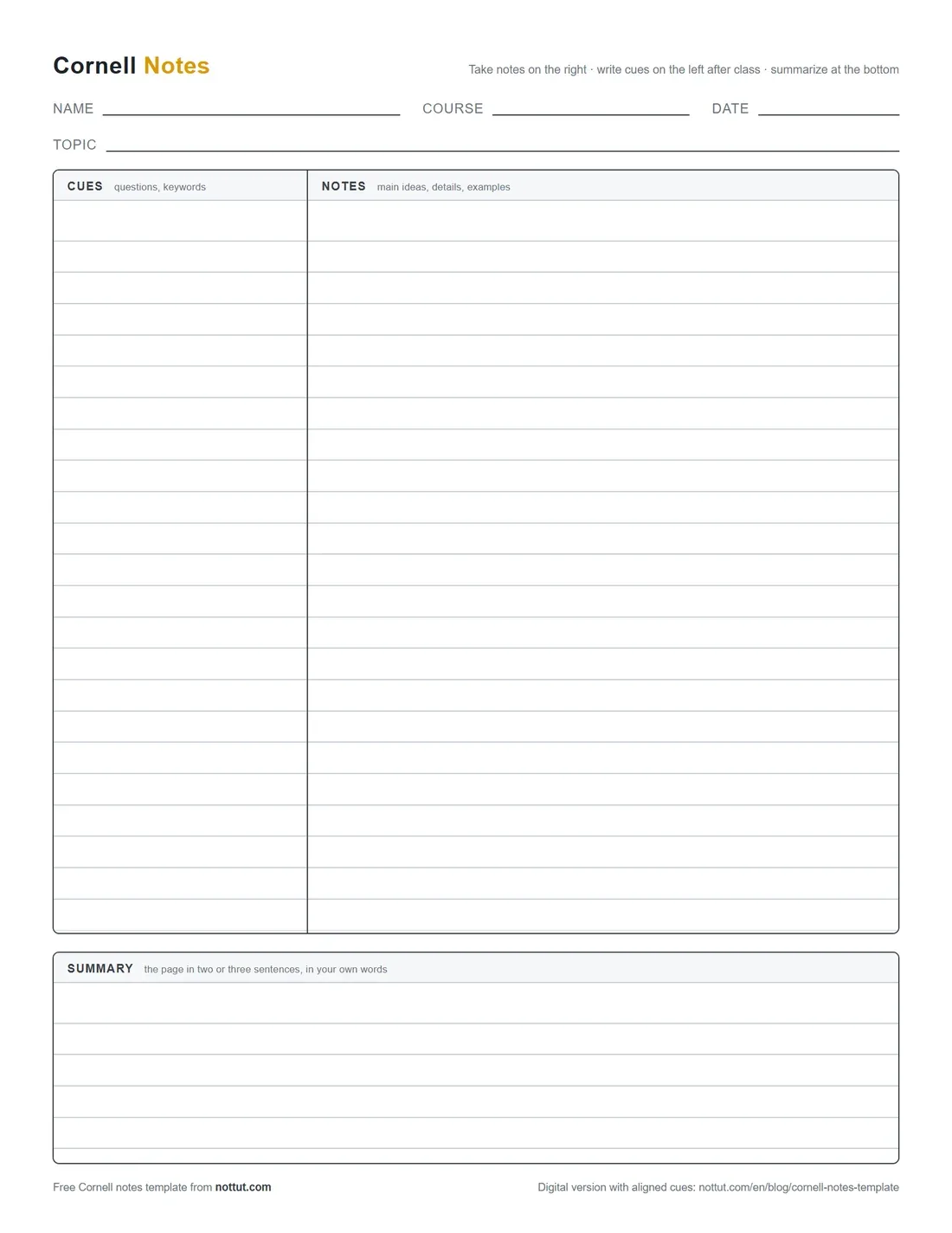
What each part of the page is for
Walter Pauk, who directed the Reading-Study Center at Cornell University, published the method in 1962 in How to Study in College and named it the Cornell System in the book's 1974 edition. His later editions, and Cornell's Learning Strategies Center today, give the page three parts: a 2½-inch cue column, a 6-inch notes column and a 2-inch summary strip across the bottom.
| Part | Where | What goes in it |
|---|---|---|
| Header | Top | Name, course, date and topic, so every page can be filed and found |
| Notes column | Right, about 70% | What you write during the lecture or while reading: main ideas, details, examples, diagrams |
| Cue column | Left, about 30% | Questions and keywords you add after class, one next to each block of notes |
| Summary | Bottom | Two or three sentences, in your own words, on what the whole page says |
The layout does one job: it separates taking notes from testing yourself on them. The notes column is for the lecture; the cue column turns those notes into questions you can answer later without looking.
How to take Cornell notes, step by step
Pauk first taught the method as five R's: Record, Reduce, Recite, Reflect, Review. Later editions of his book, and Cornell's own handout, turn Reduce into Question and add a written summary. Here is that later version as six steps:
- Record. During the lecture, write in the notes column: main ideas, facts, examples. Skip a line between ideas so each one has room for a cue.
- Fill the gaps the same day. Reread the page while you still remember the lecture, and fix anything unclear or missing.
- Question. In the cue column, write a question for each main idea, level with the notes that answer it.
- Recite. Cover the notes column, read each cue and answer it out loud in your own words. Uncover, check, and go back to the ones you missed.
- Reflect and summarize. Think about how the ideas connect, then write two or three sentences at the bottom on what the page says.
- Review. Go over the page again soon, then in short, regular sessions. Cornell's Learning Strategies Center suggests at least 10 minutes a week.
Steps 4 and 6 do most of the work. Answering a cue from memory is retrieval practice, and coming back to it over days is spaced practice: the two study techniques with the strongest evidence behind them (more on that below).
A filled-in Cornell notes example
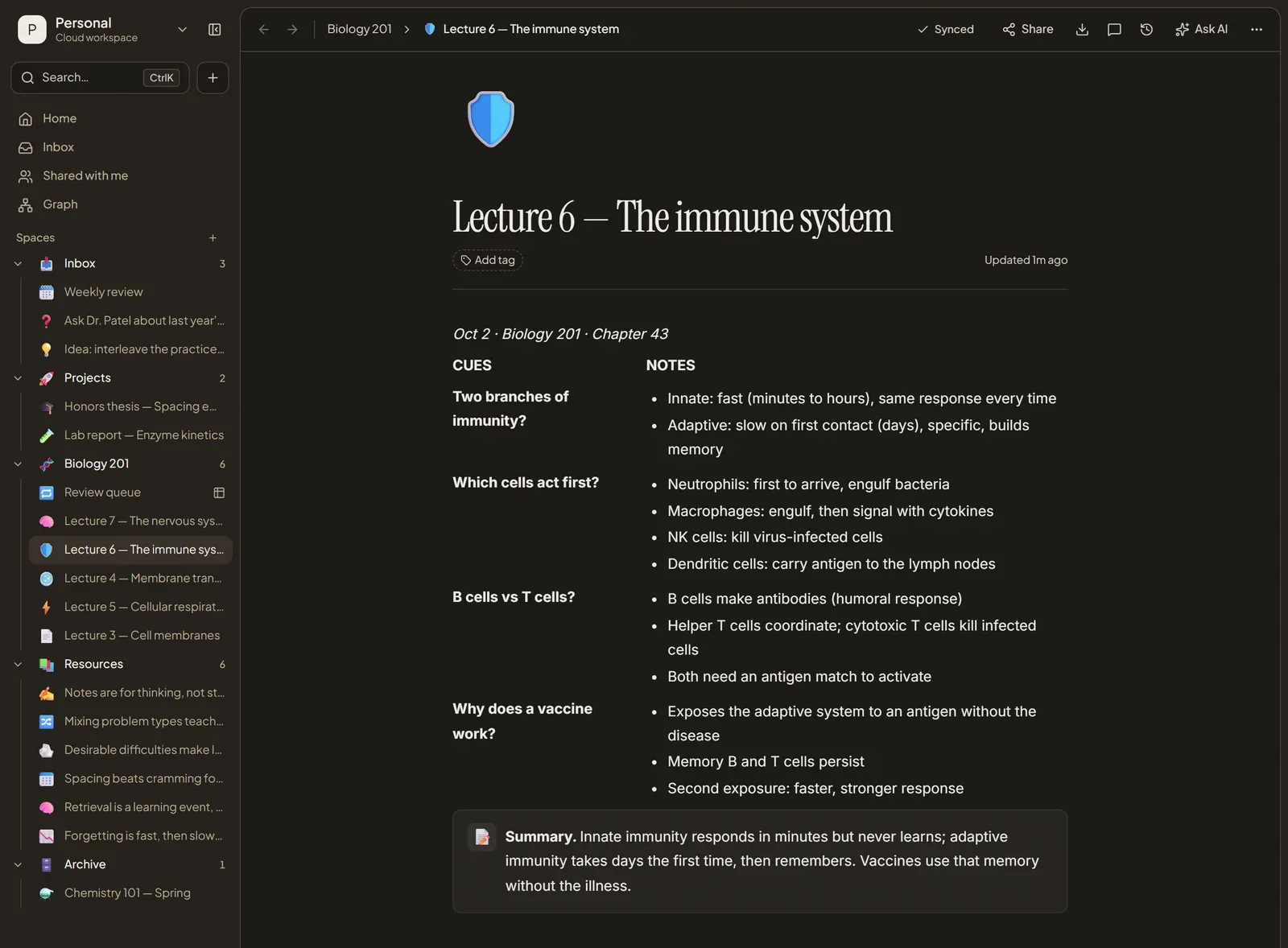
Here is one page from an intro biology lecture on the immune system, written the Cornell way.
| Cues | Notes |
|---|---|
| Two branches of immunity? | Innate: fast (minutes to hours), same response every time. Adaptive: slow on first contact (days), specific, builds memory. |
| Which cells act first? | Neutrophils arrive first and engulf bacteria. Macrophages engulf, then signal with cytokines. NK cells kill virus-infected cells. Dendritic cells carry antigen to the lymph nodes. |
| B cells vs T cells? | B cells make antibodies (humoral response). Helper T cells coordinate; cytotoxic T cells kill infected cells. Both need an antigen match to activate. |
| Why does a vaccine work? | It exposes the adaptive system to an antigen without the disease. Memory B and T cells persist, so a second exposure brings a faster, stronger response. |
Summary: Innate immunity responds in minutes but never learns; adaptive immunity takes days the first time, then remembers. Vaccines use that memory without the illness.
Notice that each cue is a question, not a heading. "Two branches of immunity?" is something you can answer from memory; "Immunity" is not.
Digital Cornell notes in Nottut
Nottut has no special "Cornell mode", and it does not need one. The layout is made of two ordinary blocks: two columns you can resize, and a callout for the summary. You set it up once, save it as a template, and start every lecture from it.
A digital page also fixes the one thing paper does badly: on paper, the cue column and the notes drift apart as you write. Here, each cue sits in the same row as the notes it belongs to, however long those notes get.
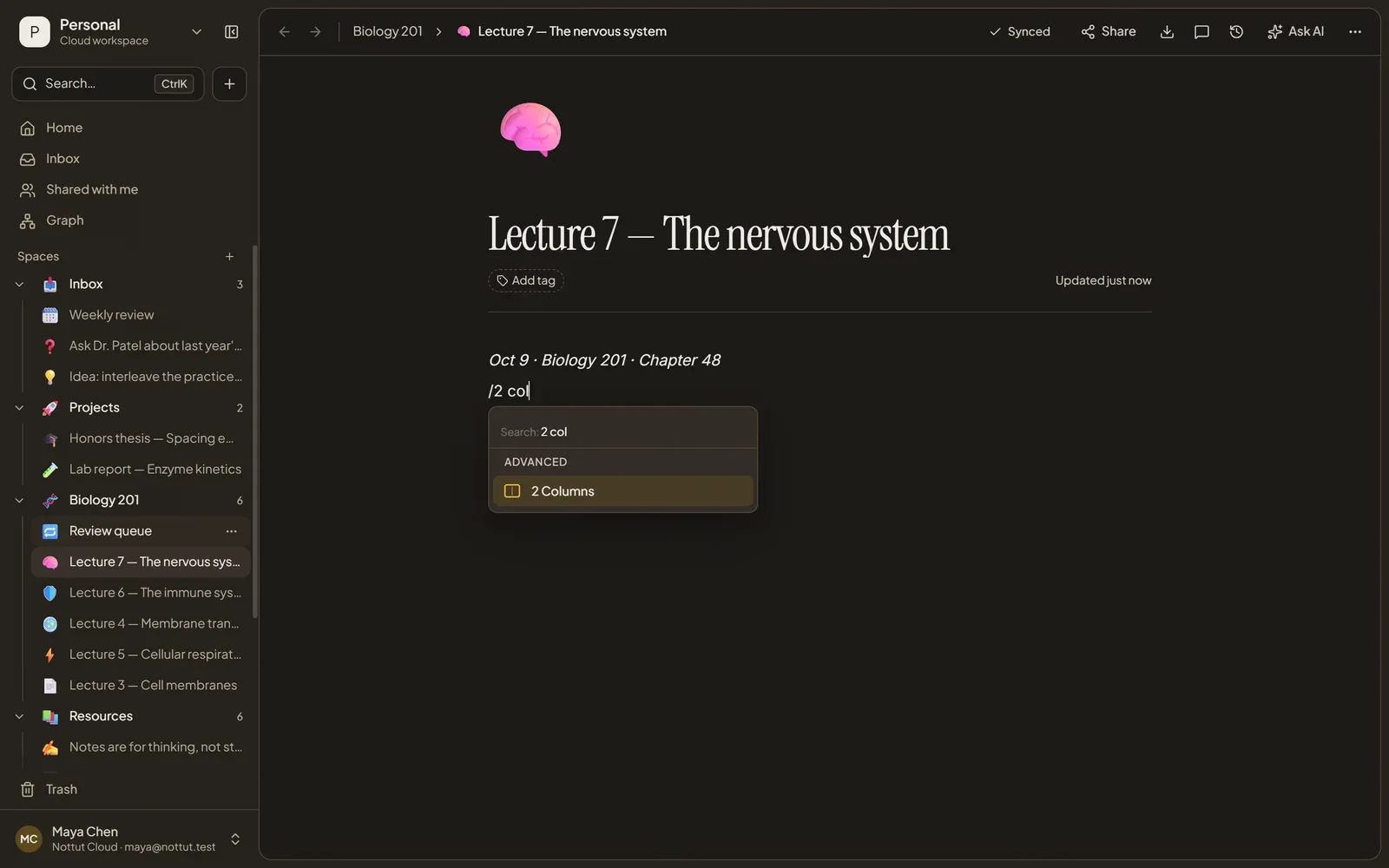
Set up the template once
- Create a page and give it a title such as "Cornell notes".
- Add a two-column row. Type
/2 coland choose 2 Columns. - Make the left column narrower. Drag the divider between the columns until the left one is about a third of the width.
- Label the first row. Type CUES on the left and NOTES on the right, then add a few more two-column rows below it.
- Add the summary. Below the rows, type
/calloutand write "Summary" in it. - Save it as a template. Open the ··· menu at the top right of the page and choose Save as template.
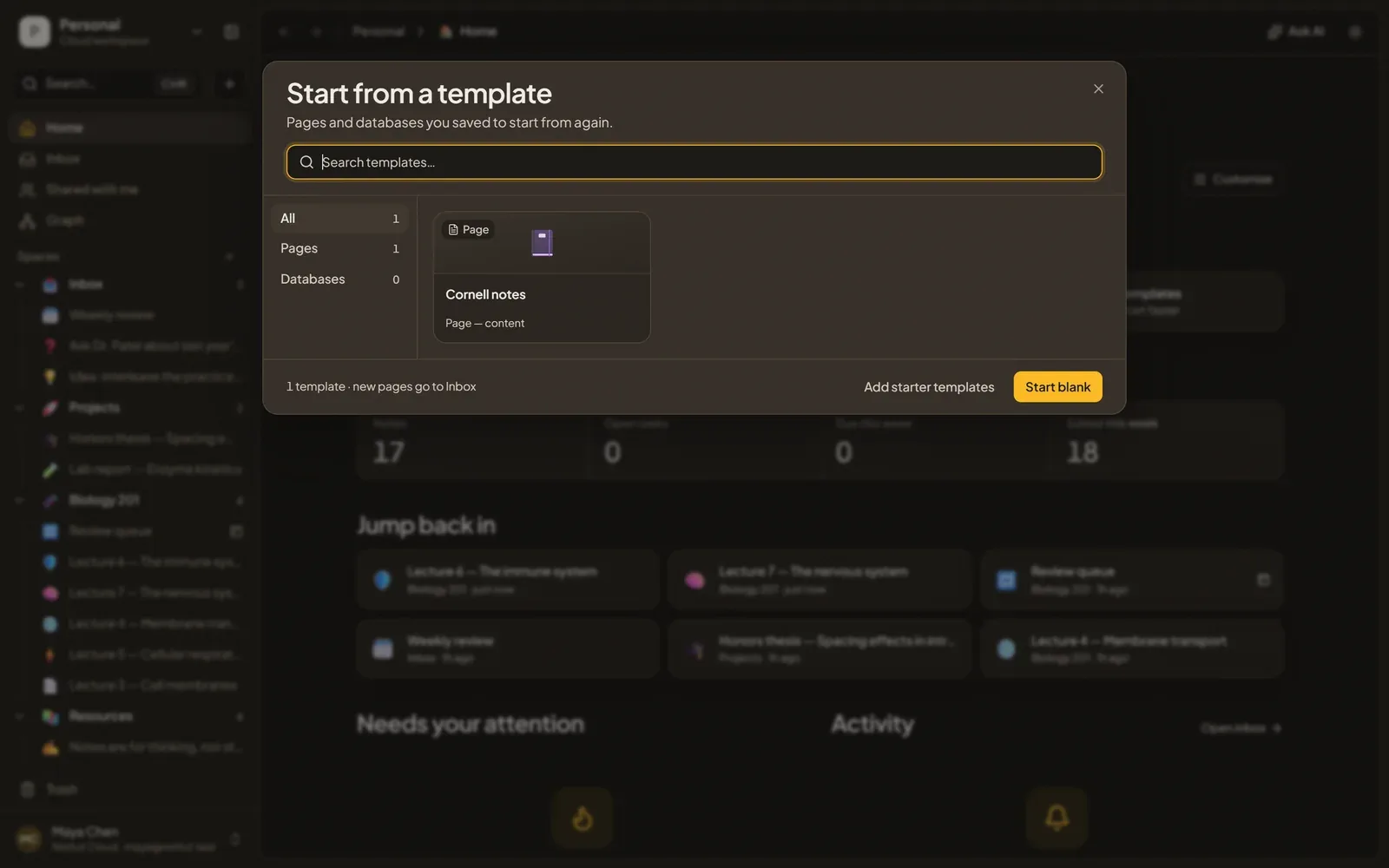
Use it for every lecture
- From Home, open Templates and choose Cornell notes. A new page opens with the layout ready; rename it after the lecture.
- During the lecture, write in the right column. Start a new row whenever the topic changes, so the next cue has its own row.
- After the lecture, go back through the page and write one question in the left column of each row.
- Before the next lecture, write the summary.
Review it without paper to cover
On paper you cover the notes column with a sheet and answer the cues from memory. On screen, read each cue and answer it out loud or on scrap paper before your eyes move to the right, then check. If a cue keeps beating you, put its answer in a toggle so it stays hidden until you have tried, and add the topic to a review queue with a date for the next review. Our guide to active recall and spaced repetition shows how to set that queue up in Nottut.
Do Cornell notes work?
Less is known than most template pages suggest. There is no meta-analysis of Cornell notes, and the direct studies are small, with mixed results:
- In a high-school class split into two sections, students using Cornell notes scored about the same on three unit tests as students who took notes their own way (Quintus et al., 2012).
- In a study of 101 eighth graders reading at home with interruptions, every note-taking group beat taking no notes. Handwritten Cornell notes, typed Cornell notes and the students' own notes scored about the same: 7.87, 7.61 and 7.07 out of 10, against 5.87 with no notes (Evans & Shively, 2019).
- In a study of 160 college students in Nigeria, Cornell note-takers recalled more of a lecture than students who wrote outlines or copied it word for word (Akintunde, 2013).
The "Cornell notes raise scores by 10–12%" figure you may see online comes from a literacy coach's classroom report (Donohoo, 2010), not from a controlled study.
The steps of the method, though, rest on some of the best-replicated findings in learning research:
- Recite is retrieval practice. Testing yourself beats rereading when the test comes two days or a week later, even though rereading looks better five minutes after studying (Roediger & Karpicke, 2006). A meta-analysis of 159 effect sizes found an average benefit of g = 0.50, and 0.61 for cued recall, which is what answering a cue question is (Rowland, 2014).
- Review is spaced practice. Spreading reviews over days beats spending the same time in one sitting (Cepeda et al., 2006).
- In a large review of ten study techniques, practice testing and spaced practice were the only two rated high utility. Rereading, highlighting and summarizing were rated low (Dunlosky et al., 2013).
So the layout is not magic on its own. It works when you use the cue column to test yourself and keep coming back to it. A page that is filled in once and never reviewed does little. The summary still earns its place: it makes you decide what mattered, and it shows you quickly whether you understood the page.
Tips for better Cornell notes
- Write cues as questions. A question makes you retrieve; a keyword only reminds you.
- Leave space as you go. Skip a line between ideas so each cue has room next to its notes.
- Do the cue column within a day. It is easier while you still remember what the lecturer meant.
- Keep the summary short. Two or three sentences force you to decide what mattered.
- Test yourself more than once. One pass the night before is the weakest way to use the page.
FAQ
Is there a Cornell notes template for Google Docs or Word?
You can recreate the layout in Google Docs or Word with a two-column table and a box below it. The printable PDF above is the quickest paper option. For typed notes, a notes app with resizable columns keeps each cue next to its notes as the page grows, which a single table cell does not do well.
What size should the Cornell columns be?
Pauk's later editions use a 2½-inch cue column, a 6-inch notes column and a 2-inch summary on US Letter paper. Those widths add up to the full 8½ inches of the sheet, so a printable template has to shrink them to leave room for printer margins. The template above keeps the same proportions instead: about 30% for cues and 70% for notes.
Can I print Cornell notes on A4?
Yes. A4 is narrower than Letter (210 mm against 216 mm), so the inch measurements do not carry over as they are. The A4 version of the template keeps the same 30/70 split, which works out to roughly a 55 mm cue column and a 130 mm notes column inside the margins.
Should I take Cornell notes by hand or on a laptop?
Either works. The well-known 2014 study that favored longhand (Mueller & Oppenheimer) did not hold up well in direct replications (Morehead, Dunlosky & Rawson, 2019; Urry et al., 2021). A 2024 meta-analysis found a small advantage for handwritten notes that were also reviewed, while typing captured more of the lecture (Flanigan et al., 2024). In the Evans & Shively study above, typed and handwritten Cornell notes scored about the same. What matters more is writing in your own words rather than transcribing, and testing yourself afterwards.
Can I use Cornell notes on an iPad or tablet?
Yes. Open the PDF in any note-taking app that lets you write on PDFs and use it as a page background. For typed notes, Nottut runs in the browser on a tablet, and the two-column rows stay side by side on smaller screens.
What is the difference between Cornell notes and outline notes?
Outline notes put everything in one indented list. Cornell notes add two things an outline lacks: a column of questions for testing yourself, and a summary that makes you condense the page.
Are Cornell notes effective?
The direct evidence is thin: a handful of small studies with mixed results, and no meta-analysis. The method's recall and review steps, though, use the two best-supported study techniques, retrieval practice and spaced practice. Cornell notes help when you actually test yourself on the cues and come back to them over time.
The short version
Print the template, take notes on the right, add questions on the left after class, and summarize at the bottom. Then keep testing yourself on the cues. If you would rather type, build the same layout in Nottut from two blocks, save it as a template and reuse it every lecture. Get started free.
Related reading: The Cornell note-taking method, in depth · Active recall and spaced repetition · How to turn notes into finished work
Sources
- Akintunde, O. O. (2013). Effects of Cornell, verbatim and outline note-taking strategies on students' retrieval of lecture information in Nigeria. Journal of Education and Practice, 4(25), 67–73. iiste.org
- Cepeda, N. J., Pashler, H., Vul, E., Wixted, J. T., & Rohrer, D. (2006). Distributed practice in verbal recall tasks: A review and quantitative synthesis. Psychological Bulletin, 132(3), 354–380. doi:10.1037/0033-2909.132.3.354
- Cornell University Learning Strategies Center. The Cornell note-taking system. lsc.cornell.edu
- Donohoo, J. (2010). Learning how to learn: Cornell notes as an example. Journal of Adolescent & Adult Literacy, 54(3), 224–227. doi:10.1598/JAAL.54.3.9
- Dunlosky, J., Rawson, K. A., Marsh, E. J., Nathan, M. J., & Willingham, D. T. (2013). Improving students' learning with effective learning techniques. Psychological Science in the Public Interest, 14(1), 4–58. doi:10.1177/1529100612453266
- Evans, B. P., & Shively, C. T. (2019). Using the Cornell note-taking system can help eighth grade students alleviate the impact of interruptions while reading at home. Journal of Inquiry and Action in Education, 10(1). ERIC EJ1205170
- Flanigan, A. E., Wheeler, J., Colliot, T., Lu, J., & Kiewra, K. A. (2024). Typed versus handwritten lecture notes and college student achievement: A meta-analysis. Educational Psychology Review, 36, 78. doi:10.1007/s10648-024-09914-w
- Morehead, K., Dunlosky, J., & Rawson, K. A. (2019). How much mightier is the pen than the keyboard for note-taking? A replication and extension of Mueller and Oppenheimer (2014). Educational Psychology Review, 31(3), 753–780. doi:10.1007/s10648-019-09468-2
- Mueller, P. A., & Oppenheimer, D. M. (2014). The pen is mightier than the keyboard: Advantages of longhand over laptop note taking. Psychological Science, 25(6), 1159–1168. doi:10.1177/0956797614524581
- Pauk, W. (1962). How to study in college. Houghton Mifflin. Second edition, 1974.
- Quintus, L., Borr, M., Duffield, S., Napoleon, L., & Welch, A. (2012). The impact of the Cornell note-taking method on students' performance in a high school family and consumer sciences class. Journal of Family and Consumer Sciences Education, 30(1), 27–38. natefacs.org
- Roediger, H. L., & Karpicke, J. D. (2006). Test-enhanced learning: Taking memory tests improves long-term retention. Psychological Science, 17(3), 249–255. doi:10.1111/j.1467-9280.2006.01693.x
- Rowland, C. A. (2014). The effect of testing versus restudy on retention: A meta-analytic review of the testing effect. Psychological Bulletin, 140(6), 1432–1463. doi:10.1037/a0037559
- Urry, H. L., et al. (2021). Don't ditch the laptop just yet: A direct replication of Mueller and Oppenheimer's (2014) Study 1 plus mini meta-analyses across similar studies. Psychological Science, 32(3), 326–339. doi:10.1177/0956797620965541