Note-Taking Workflow: How to Turn Notes Into Finished Work
A note-taking workflow turns what you read, hear and think into finished work. The five stages, from capture to review, and how to set them up.
Most people who take notes seriously run into the same problem sooner or later. The collection grows: saved articles, exported highlights, meeting notes, lecture notes, ideas at midnight. It is organized, even tidy. And the essay, the report or the exam answer still starts from a blank page.
The missing piece is rarely a better app or a new method. It is a workflow: the path a piece of information takes from the moment you meet it to the moment you use it. This guide lays out that path in five stages and shows where the popular methods fit: PARA, Zettelkasten, Getting Things Done and the second brain. It then walks through a real setup, with screenshots from Nottut.
Key takeaways
- A note-taking workflow has five stages: capture, organize, connect, create and review.
- Capture fast, into one inbox. Deciding where things go is a separate step.
- Organize by what you are working on, not by topic.
- Connect notes with links, and write each note so it makes sense on its own.
- Make something from your notes every week, and review weekly so the system stays trustworthy.
Table of contents
- What is a note-taking workflow?
- Stage 1: Capture
- Stage 2: Organize
- Stage 3: Connect
- Stage 4: Create
- Stage 5: Review
- One week of the workflow, start to finish
- Set it up in Nottut in 20 minutes
- Which method should you use?
- Why workflows fail
- FAQ
What is a note-taking workflow?
A note-taking workflow, sometimes called a personal knowledge workflow, is the repeatable process you use to turn inputs into outputs. Inputs are what you read and hear: reading, lectures, meetings, conversations, your own ideas. Outputs are what you make with them: decisions, writing, projects, exam answers. It usually has five stages: capture, organize, connect, create and review. Most well-known methods strengthen one or two of these stages. None covers all five alone.
| Stage | The question it answers | Methods that help | In Nottut |
|---|---|---|---|
| Capture | Where does this go right now? | The GTD inbox | An Inbox space and quick notes |
| Organize | What is this for? | PARA | Spaces for projects, areas, resources and the archive |
| Connect | What does this relate to? | Zettelkasten, evergreen notes | [[ page links, the graph view |
| Create | What am I making with it? | Express, the last step of the CODE method | Project pages built from linked notes |
| Review | Can I still trust the system? | The weekly review, spaced repetition | A weekly review checklist, a review queue |
Think of the stages as a loop rather than a line. Reviewing turns up new things to capture. Creating shows you which notes were worth keeping and which connections were missing.
Stage 1: Capture
The goal of capture is to get things out of your head quickly, into one place you trust. It is not the moment to decide where a note belongs or how it connects. That comes later, and mixing the two slows capture down until you stop doing it.
What to capture:
- ideas and questions, including half-formed ones
- things you have to do, with the next step
- passages worth keeping, with the source and page
- anything you would otherwise try to "keep in mind"
There is a good reason not to trust memory with open loops. In a series of experiments, E. J. Masicampo and Roy Baumeister found that unfinished goals caused intrusive thoughts during an unrelated reading task and hurt performance on word puzzles. Making a specific plan for the goal removed those effects, even though the goal itself was still unfinished. (Masicampo & Baumeister, 2011) The key word is plan: a note that says what you will do next does more than a note that only names the problem.
Two rules for good captures:
- One inbox. Five capture locations means five places to check, so none of them gets checked. Pick one and send everything there.
- Capture context, not just content. Add a line on where it came from and why it caught your attention. A quote without its source is nearly useless six months later.
Stage 2: Organize
Organizing means deciding what each capture is for. The most practical answer comes from Tiago Forte's PARA method, first published in 2017, which sorts everything by how actionable it is rather than by subject. (Forte Labs)
- Projects have a goal and a deadline: a thesis chapter, a product launch, a lab report.
- Areas are ongoing responsibilities with no end date: a course you are taking, your health, a team you lead.
- Resources are topics you are interested in or collecting for later.
- Archives hold anything from the other three that is no longer active.
Topic folders ("Biology", "Psychology") fail as a first level because the same note is useful to several projects. Folders by actionability keep what you are working on now in front of you. We cover the method in depth in our guide to the PARA method.
In practice, organizing is a short processing session, daily or a few times a week. Go through the inbox and, for each item, file it, link it or delete it. Most items are quick. The few that need thought become notes of their own.
Stage 3: Connect
This is the stage most note systems skip, and it is where a collection becomes useful. Connecting means two habits:
- Write notes that stand on their own. One idea per note, written in your own words, with a title that states the idea. "Spacing beats cramming for long-term retention" is a good title; "Spacing notes" is not. Andy Matuschak calls these evergreen notes: they should be atomic, concept-oriented and densely linked. (Matuschak)
- Link each note to what it supports or builds on. A folder gives a note one home. Links let the same note take part in several arguments.
The sociologist Niklas Luhmann built the best-known example of this: a slip-box of about 90,000 linked index cards, kept for more than four decades. Bielefeld University, which holds his archive, counts nearly 600 publications, including more than 40 books. (Niklas Luhmann Archive) You do not need paper slips or numbering systems for it. The principles carry over directly to digital notes, as our Zettelkasten guide explains.
Stage 4: Create
The point of the system is output. A note that never feeds into anything costs time to write and time to keep. This is why Tiago Forte's CODE method (Capture, Organize, Distill, Express) ends with Express. (Forte Labs) If you never share or use what you collect, the collection has not helped you.
Creating from notes gets easier once the earlier stages work:
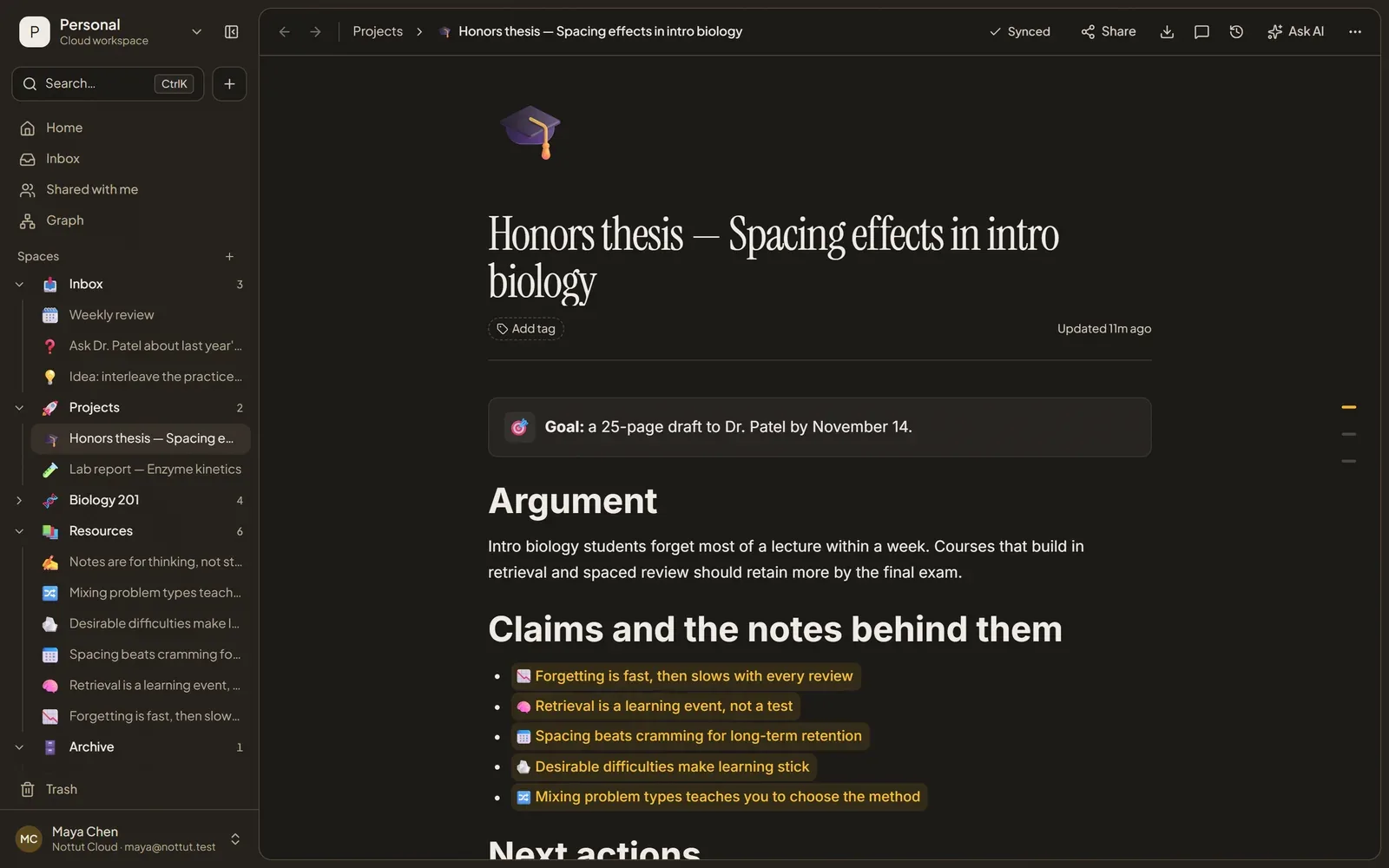
- Start a project page, not a blank document. Write the goal in one sentence and list the claims you want to make. Then link each claim to the notes that support it. A gap in the list is a note you still need to write.
- Draft claim by claim. Each section of the draft expands one claim, drawing on its linked notes. Blank-page anxiety mostly disappears when every section starts from something.
- Count small outputs. A summary for a classmate, an answer in a forum, a one-page brief for your team: each one forces you to use your notes and shows you what is missing.
Stage 5: Review
A workflow only works if you trust it, and you only trust it if you look at it regularly. The weekly review from David Allen's Getting Things Done is still the best-known version. Allen calls it the critical success factor of his method, and its three phases are get clear, get current and get creative. (Getting Things Done)
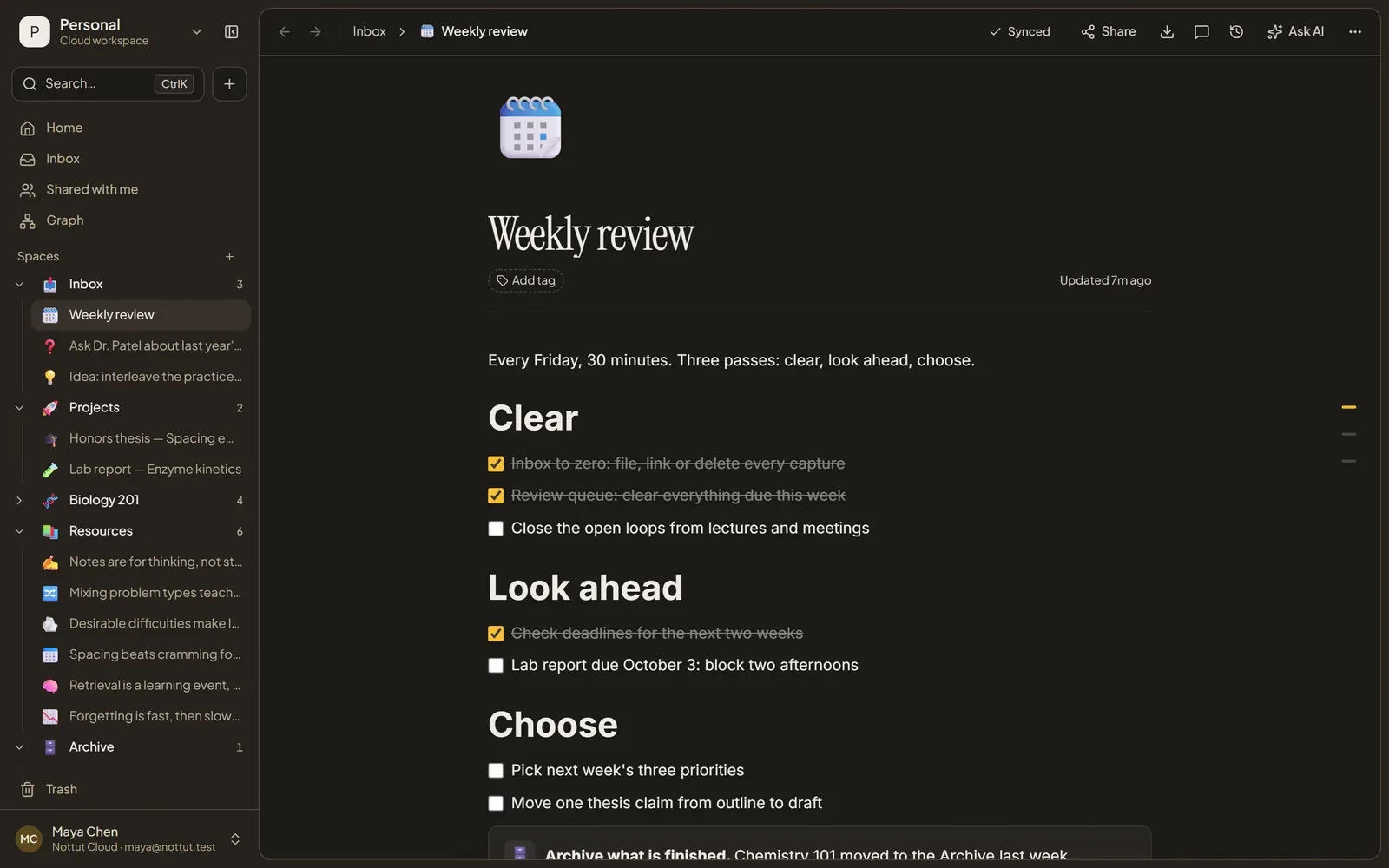
A version that fits in 30 minutes:
- Clear. Empty the inbox: file, link or delete every capture. Close the loops from the week's meetings and lectures.
- Look ahead. Check deadlines for the next two weeks and block time for anything big.
- Choose. Pick next week's three priorities, and move one project forward by a concrete step.
For material you need to remember, such as course content, certification topics or a new language, a weekly look is not enough. Add a review queue with spaced repetition. Our guide to active recall and spaced repetition shows how to run one from your notes.
One week of the workflow, start to finish
Here is the loop in practice, following Maya, a biology student writing an honors thesis on spacing effects in intro biology:
- Monday, capture. Listening to a podcast on the bus, she writes one line in her Inbox: "Idea: interleave the practice problems?"
- Tuesday, organize. Processing the inbox, she decides the idea belongs to the thesis and moves it into Resources.
- Wednesday, connect. She rewrites it as a standalone note, "Mixing problem types teaches you to choose the method", and links it to her existing note on desirable difficulties.
- Thursday, create. The new note becomes the fifth claim on her thesis page. The draft section on problem practice now has its evidence in place.
- Friday, review. Thirty minutes: inbox to zero, the week's review queue cleared, one claim moved from outline to draft.
Nothing in this week is dramatic. That is the point: each step is small enough to happen in a normal week.
Set it up in Nottut in 20 minutes
- Create five spaces: Inbox, Projects, one space per area (a course, a job, a team), Resources and Archive.
- Send every quick note to the Inbox space. A title and a line of context are enough; sorting it out comes later.
- Give each active project a page with four parts: the goal in one sentence, the claims or plan, the linked notes, and the next actions.
- Link as you write. Type
[[to link another page. Once your notes link to each other, the graph view shows where ideas cluster and which notes stand alone. - Add a Weekly review page with the three checklists above, and put it in your calendar for Friday.
- For anything you need to remember, add a review queue database and schedule reviews by date.
Which method should you use?
You do not have to choose one. Each method below strengthens different stages, and most people end up combining two or three.
| Method | Strongest stages | Best for | Watch out for |
|---|---|---|---|
| Getting Things Done | Capture, review | Anyone juggling many commitments | It can turn into a task list with no thinking in it |
| PARA | Organize | People running several projects at once | Resources quietly becomes a dumping ground |
| Zettelkasten | Connect, create | Researchers, writers, students with long projects | Slow to pay off; needs a regular writing habit |
| Second brain (CODE) | The whole loop | Knowledge workers and creators | Collecting feels productive and can crowd out creating |
| Cornell + active recall | Capture (lectures), review | Students | Needs a review schedule to pay off |
For a wider view of the field, see our guide to personal knowledge management.
Why workflows fail
- Collecting instead of creating. Saving an article feels like progress. Unless something comes out of it, it is not.
- Organizing instead of making. Rebuilding the folder structure is a comfortable way to avoid the work that matters.
- Too many inboxes. Notes in three apps, two notebooks and a phone's camera roll mean none of them gets processed.
- Notes without context. A highlight with no source and no reason becomes noise within months.
- Switching tools every few months. Each move costs weeks of migration and resets your habits. A simple system you keep beats a perfect one you abandon.
- Skipping the review. Without it, the inbox fills, projects drift and you stop trusting the system. Once that happens, you stop using it.
FAQ
What is the difference between PKM and a note-taking workflow?
Personal knowledge management (PKM) is the broad practice of collecting, organizing and using what you know. A note-taking workflow is the concrete, repeatable process behind it: the steps a piece of information goes through from capture to finished work, and the routine that keeps those steps running.
Do I need both PARA and Zettelkasten?
Not necessarily, but they combine well because they solve different problems. PARA organizes notes by what you are working on; Zettelkasten connects ideas so they build on each other. Many people use PARA for the structure and write Zettelkasten-style linked notes inside Resources.
How long should a weekly review take?
Plan for 30 to 60 minutes. A short review you do every week is worth more than a thorough one you skip. David Allen's own material suggests early Friday afternoon. Clear the inbox, look two weeks ahead, and choose next week's priorities.
What is the best app for a note-taking workflow?
Any app that makes capture fast, lets you organize notes by project, links notes to each other and shows dates on a calendar will do. Nottut covers all four: a space you use as your inbox, spaces for projects and areas, [[ page links with a graph view, and databases with calendar views.
How do I stop collecting and start creating?
Set a small, regular output: one short piece of writing, a summary or an answer each week, built from your notes. Start it on a project page that lists your claims and links the supporting notes. The gaps you find show you what to read next, which turns collecting into a means rather than an end.
The short version
Capture everything in one place. Organize by what you are working on. Connect notes so ideas can meet. Make something from them every week. Review weekly so you keep trusting the system. None of these steps takes long; the benefit comes from doing all five, every week.
Nottut has a part for each stage: an Inbox space for capture, spaces for PARA, linked pages and a graph for connecting, and databases with calendar views for review. Get started free and set up your five spaces in the next 20 minutes.
Related reading: PKM guide · Second brain system · The PARA method · The Zettelkasten method · Active recall and spaced repetition
Sources
- Allen, D. (2001). Getting Things Done: The Art of Stress-Free Productivity. Viking. Revised edition 2015. Weekly Review checklist: gettingthingsdone.com
- Forte, T. (2017). The PARA Method. Forte Labs. fortelabs.com/blog/para
- Forte, T. (2022). Building a Second Brain. Atria Books. CODE overview: fortelabs.com/blog/basboverview
- Masicampo, E. J., & Baumeister, R. F. (2011). Consider it done! Plan making can eliminate the cognitive effects of unfulfilled goals. Journal of Personality and Social Psychology, 101(4), 667–683. doi.org/10.1037/a0024192
- Matuschak, A. Evergreen notes. notes.andymatuschak.org
- Niklas Luhmann Archive, Bielefeld University. uni-bielefeld.de
- Schmidt, J. F. K. (2018). Niklas Luhmann's card index: The fabrication of serendipity. Sociologica, 12(1), 53–60. doi.org/10.6092/issn.1971-8853/8350