Evernote Alternatives in 2026: What Survives the Switch
Evernote's free plan now stops at 50 notes. Here is how to export everything, which alternatives import .enex files, and what each one keeps or drops.
If you are looking for an Evernote alternative in 2026, the hard part is not picking an app. It is getting years of notes out of Evernote with their notebooks, tags, pictures and attachments intact. Evernote's export has three rules that catch most people out: it only runs in the desktop app, it handles 100 notes or one notebook at a time, and the .enex file it writes has no notebook name in it.
This guide covers why people are leaving, how to export everything properly, which alternatives can read an .enex file, and what each one keeps. We imported a real export into Nottut and wrote down exactly what came through, including what did not.
Key takeaways
- Evernote is not shutting down, but its free plan now stops at 50 notes, one notebook and one device. Unlimited notes cost $249.99 a year on the Advanced plan.
- Export from the desktop app, one notebook per file. An
.enexfile keeps notes, tags, dates and attachments, but not the notebook name, notebook stacks or nested tags. - Not every "alternative" imports
.enex. Notion connects to your Evernote account instead, OneNote retired its importer in 2022, and Apple Notes imports only on a Mac. - Check what an importer keeps before you commit: tags, attachments, checklists, original dates, Evernote tasks and links between notes are where apps differ most.
- In Nottut, each
.enexfile becomes a notebook page with its notes inside. Text, tables, checklists, tags, images, files and the original created and updated dates come through; Evernote tasks and note-to-note links do not yet.
Table of contents
- Why people are leaving Evernote
- Is Evernote shutting down?
- How to export all your Evernote notes
- What an .enex file keeps and loses
- Which Evernote alternatives can import .enex files
- How to choose an Evernote alternative
- Nottut as an Evernote alternative: what we tested
- What does not carry over to Nottut yet
- Who should not choose Nottut
- A checklist before you cancel Evernote
- FAQ
Why people are leaving Evernote
Evernote's plans have changed many times since its owner, Bending Spoons, bought it in January 2023. These are the changes behind most "Evernote alternative" searches:
| Date | Change |
|---|---|
| Apr 2023 | The Personal plan went from $69.99 to $129.99 a year. |
| Dec 2023 | The free plan was capped at 50 notes and one notebook. |
| Aug 2024 | The free plan was cut to one device, and Evernote Web counts as that device. |
| Nov 2025 | Personal and Professional were retired and replaced by Starter and Advanced. |
Here is what the plans look like now, from Evernote's help center:
| Plan | Price (US) | Limits |
|---|---|---|
| Free | $0 | 50 notes, 1 notebook, 1 device |
| Starter | $14.99/mo or $99/yr | 1,000 notes, 20 notebooks, 3 devices |
| Advanced | $24.99/mo or $249.99/yr | Unlimited notes, notebooks and devices |
In the euro zone the yearly prices are €79.90 for Starter and €199.99 for Advanced; in the UK, £64.90 and £154.90. Over the limit, you can still open, edit, share and export your notes, but you cannot create new ones. Notes in the trash count toward the limit.
Put together, keeping an unlimited number of notes cost $69.99 a year in 2021 and $249.99 a year now, about 3.6 times as much. Bending Spoons' own filing with the SEC says usage limits triggered 51% of Evernote's paid conversions in 2025.
Is Evernote shutting down?
No. Evernote 11 shipped in January 2026 with an AI assistant, semantic search and AI meeting notes, and Evernote is still one of Bending Spoons' main products. What changed is the team: Bending Spoons' filing says the team working on Evernote went from 341 full-time equivalents to 60 by the end of 2024. You do not have to leave in a hurry, but if the limits or the price no longer suit you, export while your account still works the way you expect.
How to export all your Evernote notes
Exporting works only in the Evernote desktop app for Windows or Mac. Evernote Web cannot export .enex or HTML files, and the phone apps cannot either.
- Install the Evernote desktop app and sign in. On the free plan's one-device limit, you may have to sign out of Evernote on your phone or in the browser first.
- Go to Notebooks, open the menu (•••) next to a notebook and choose Export notebook… To export only some notes, select up to 100 of them, right-click and choose Export…
- Choose ENEX as the format and tick the attributes you want to keep, such as tags and created dates.
- Save the file. Name it after the notebook, because the file name is the only place that name will survive.
- Repeat for each notebook.
Three rules to know before you start:
- 100 notes at a time, or a whole notebook. Evernote's help center states this limit. Exporting notebook by notebook is the practical way to get everything.
- One notebook per file. An
.enexfile does not record which notebook a note came from, so if you export several notebooks into one file, the structure is gone. - Old workarounds no longer work. Guides that tell you to install "Evernote Legacy" to export everything are out of date: every legacy desktop app stopped working on March 26, 2024.
If you have hundreds of notebooks, the open-source tool evernote-backup can back up your account through Evernote's API and write one .enex file per notebook. It is not made by Evernote, so read its documentation before you use it.
What an .enex file keeps and loses
An .enex file is XML. Each note keeps its content, along with what the format describes:
| Kept in the .enex file | Not in the .enex file |
|---|---|
| Title, text and formatting, tables and lists | The notebook name |
Checkboxes (en-todo), with their checked state | Notebook stacks |
| Images and attachments, embedded in the file | Nested tags (tags are flat names) |
| Tags | Note history |
| Created and updated dates | Sharing settings |
| Author, source URL and location | Working links between notes (they stay as evernote:/// addresses) |
| Evernote 10+ tasks, with due dates and reminders | |
| Encrypted text, still encrypted |
Two practical consequences follow. Tag your notes before you export if their notebook matters, because a tag survives the file and a notebook name does not. And decrypt any encrypted text in Evernote first: no other app has the key, so it would import as a locked block you cannot open.
Which Evernote alternatives can import .enex files
Most "best Evernote alternatives" lists rank apps without checking whether they can actually read your export. This is what each app's own documentation says:
- Joplin: yes, with File → Import → ENEX. Keeps notebooks, tags, attachments and metadata, and drops OCR data. Links between notes mostly survive.
- Obsidian: yes, with the official Importer plugin. Notes become Markdown files. Nested tags and notebook stacks need renaming tricks.
- Apple Notes: yes, on a Mac only. Everything goes into one "Imported Notes" folder. Tags import on macOS 13 or later.
- UpNote: yes. It can use the file name as the notebook. Links between notes are kept but not converted.
- Bear: yes, with an option to keep original dates. Notebooks are lost, so tag notes before exporting.
- Notion: no file upload. You connect your Evernote account instead. Notebooks become pages and notes become database items, and Notion warns that images may break and dates may be wrong.
- OneNote: no. Microsoft retired its Evernote importer in September 2022.
- Nottut: yes, in the web app. We tested it below.
How to choose an Evernote alternative
Start with how you use Evernote, not with feature lists:
- You want plain files on your own computer and you work offline: Obsidian or Joplin. Both store notes locally, and by its own documentation Joplin's
.eneximport keeps the most of the free options. - You live in Apple's apps: Apple Notes is free and already on your devices, as long as you import from a Mac and accept losing notebooks.
- You mostly clip web pages and scan documents: check that your new app has a web clipper and text search inside images and PDFs before you move. Several popular alternatives, Nottut included, have neither.
- You want notes, documents and databases in one place, in the browser: Notion or Nottut. Notion imports from your Evernote account; Nottut imports the
.enexfiles you exported.
Whatever you pick, test it with one notebook first. Import it, open five notes with pictures, attachments and checklists, and only then move the rest.
Nottut as an Evernote alternative: what we tested
Nottut is a note-taking app that runs in the browser. Every note is a page, and every folder can become a database with table, board, calendar and gallery views. The free plan has no limit on the number of notes, notebooks or devices; it includes 200 MB of cloud storage for attachments and 7 days of version history.
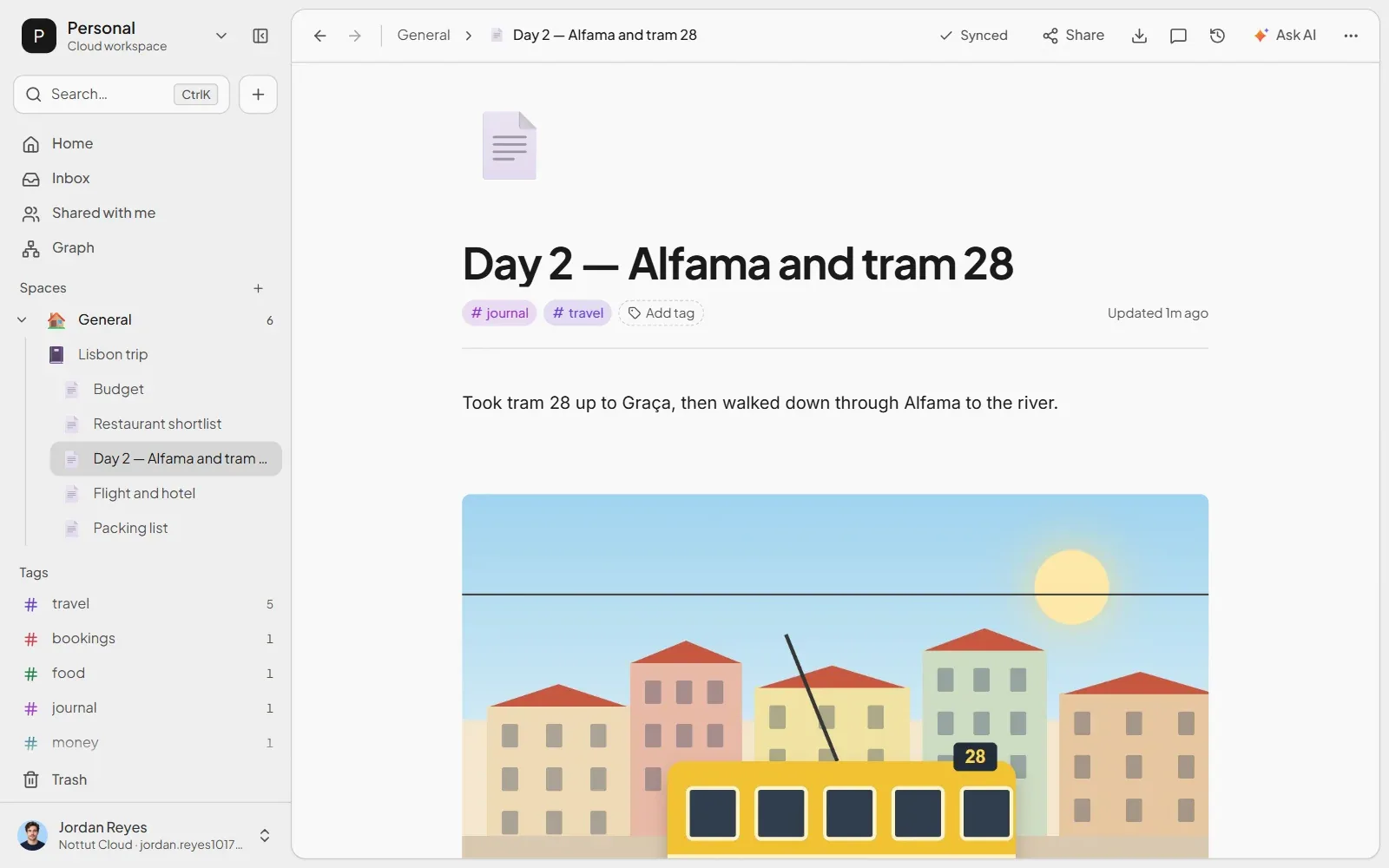
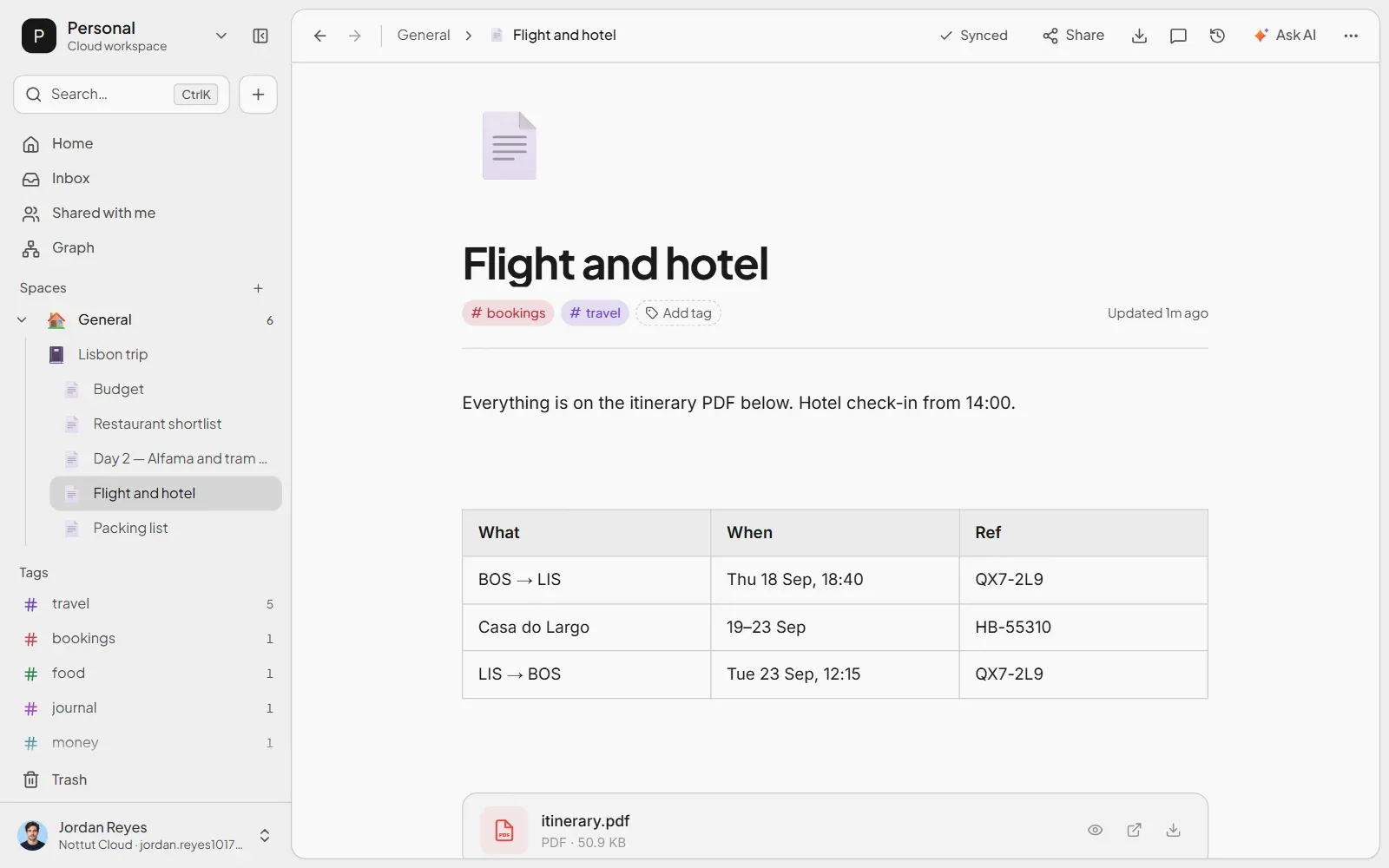
To see exactly what an import keeps, we built a small travel notebook in Evernote's export format (ENEX 4), Lisbon trip.enex, and imported it into a new account on Nottut's free plan. It had five notes: a packing checklist, a note with a PDF itinerary and a bookings table, a day journal with a photo, a restaurant table with a link to another note, and a budget table. The checklist note also carried one Evernote task.
To import: click + in the sidebar, choose Import, and select your .enex files. You can also drag them onto the window. The import starts right away and reports on every note.
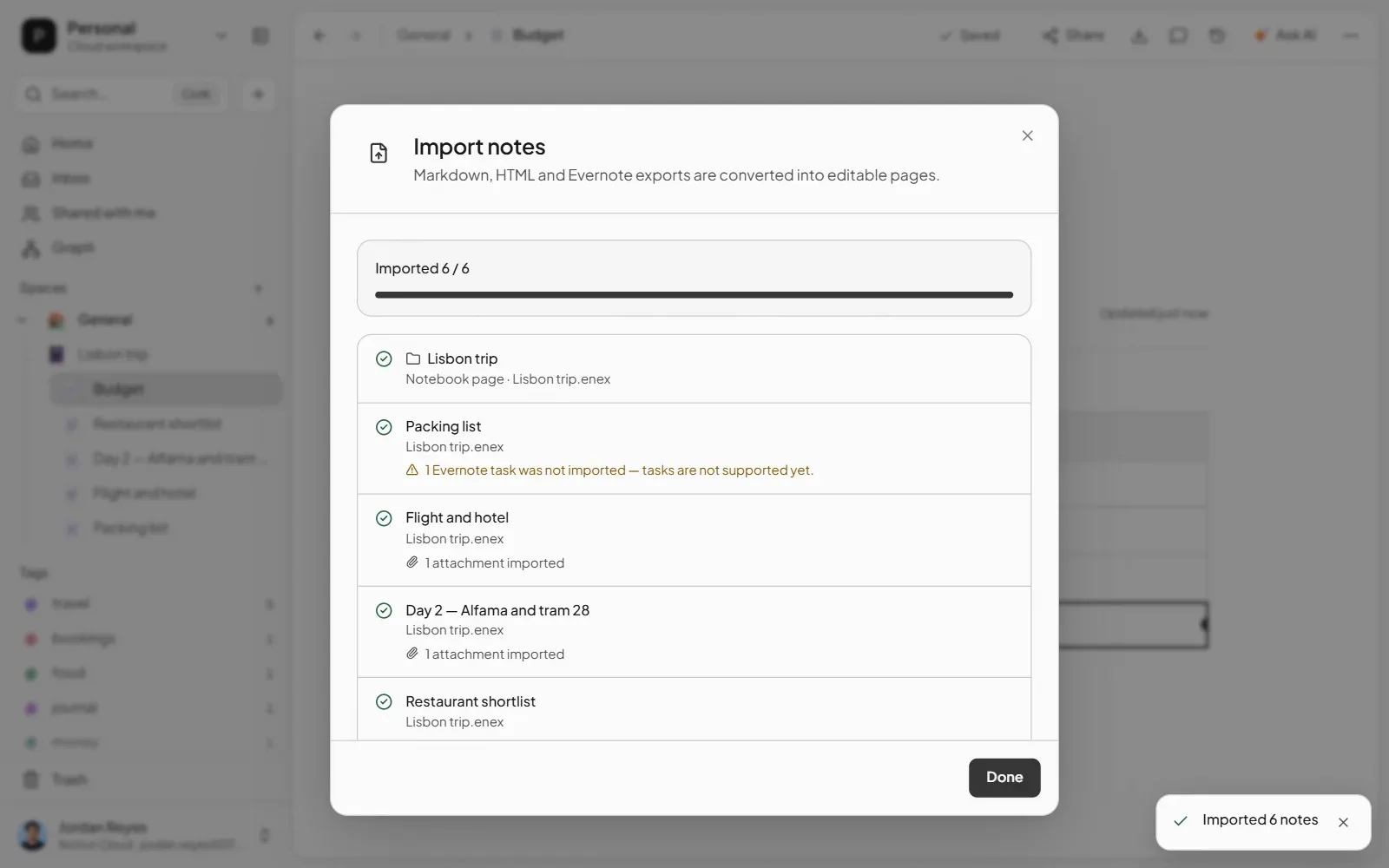
The notebook comes back as a page. Because the file name is the only place a notebook name survives, Nottut creates a page named after the file (here, Lisbon trip) and puts its notes inside it. Each .enex file with more than one note becomes its own notebook page.
Photos appear in place, and other files become attachments. The picture in the journal note showed up at full size where it was in the note. The PDF itinerary became a file block you can preview, open or download, and it counts toward your storage.
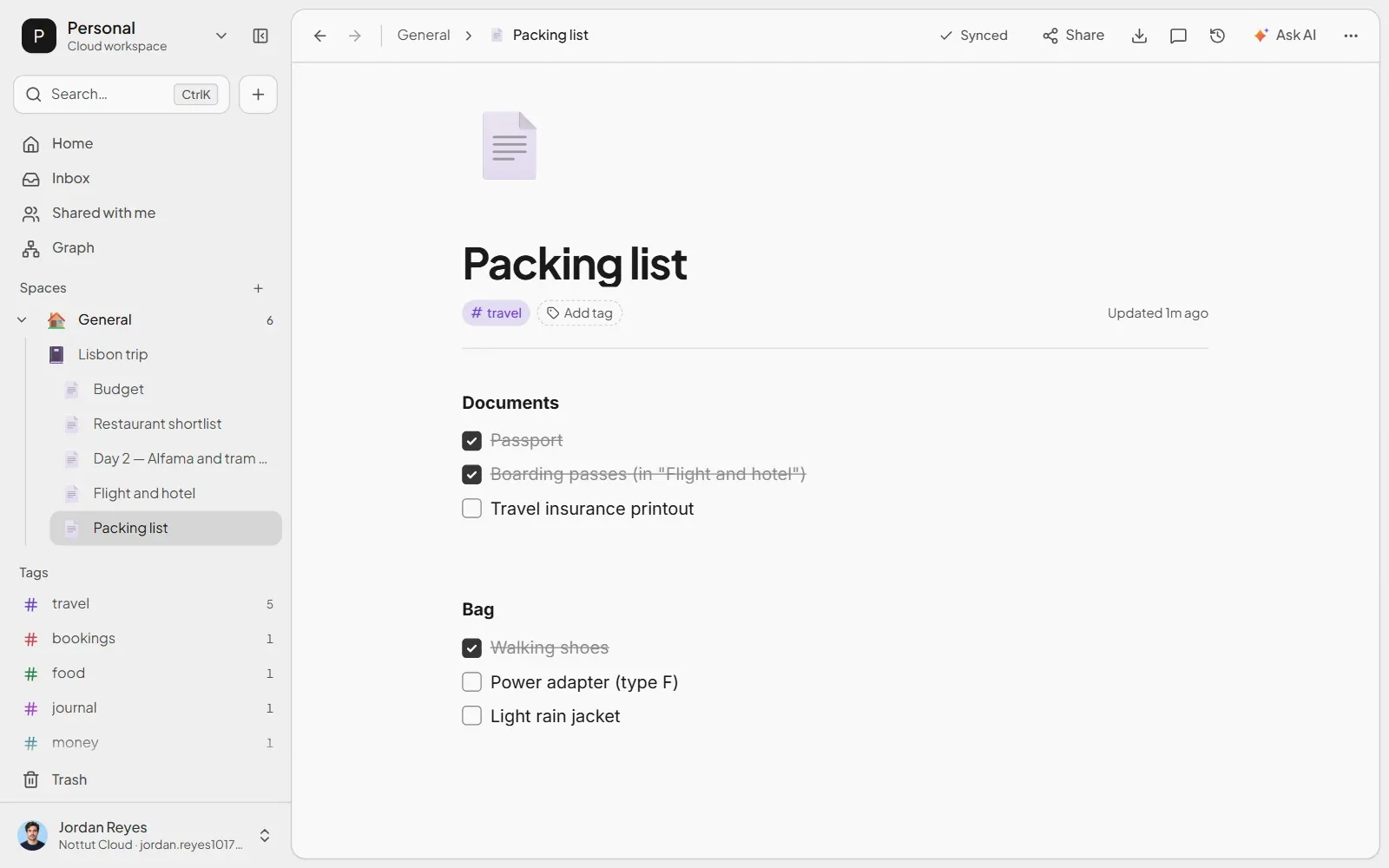
Checklists keep their ticks. Evernote checkboxes become a to-do list, and every item kept its checked or unchecked state.
Tags come along. Every note kept its tags, and the five tags appeared in the sidebar with their counts.
So do the dates. Each note keeps when it was created and last updated in Evernote, and its header shows both. Once you edit a note in Nottut, its updated date moves to that edit; the created date stays.
Here is everything in one table:
| In the Evernote note | In Nottut after import |
|---|---|
| Notebook | A page named after the .enex file, with the notes inside |
| Text, bold and bullet lists | Kept |
| Tables | Kept |
| Checkboxes | A to-do list, with checked states kept |
| Images | Shown in place, at full size |
| PDFs and other files | File blocks you can preview, open or download |
| Tags | Kept |
| Created and updated dates | Kept, and shown in each note's header |
| Links to other notes | The link text stays; the link does not |
| Evernote 10+ tasks | Not imported; the report says how many |
| Encrypted text | A locked placeholder |
What does not carry over to Nottut yet
We would rather you know this before you import:
- Evernote tasks. Tasks from Evernote 10 and later are not imported yet. Checkboxes in note text are imported; only tasks are not. The import report tells you how many tasks were left out and in which notes.
- Links between notes. A link to another Evernote note keeps its text but stops being a link. You can relink it by typing
[[and choosing the note. - Encrypted text. It cannot be decrypted outside Evernote, so decrypt it there before you export.
- Size limits. One import reads up to 250 notes, 64 MB per
.enexfile and 128 MB in total. Split a larger notebook by exporting it 100 notes at a time; each file then becomes its own page. - Storage. Attachments count toward your storage: 200 MB on the free plan, 5 GB on Plus and 100 GB on Pro. On the free plan, an image can be up to 10 MB and another file up to 15 MB. If an attachment does not fit, or is a type the server does not accept, such as an SVG image, it stays as a named placeholder, and the report lists it.
Who should not choose Nottut
Nottut is not the right Evernote alternative for everyone:
- You need offline access. Nottut runs in the browser and needs an internet connection. A Windows app is planned but not available yet.
- You want a native phone app. On iOS and Android, Nottut runs in the browser. You can install it to your home screen, but it is not a native app.
- You rely on the web clipper. Nottut has no browser extension for clipping pages yet.
- You search inside scanned documents. Nottut searches note titles and text, not the text inside images or PDFs.
If none of these is a deal-breaker, the free plan is enough to test a full notebook before you decide.
A checklist before you cancel Evernote
- Count your notes and attachments, so you know which plan you need in the new app.
- Tag notes by notebook if you will need the notebook later.
- Decrypt encrypted text, and note which notes have Evernote tasks.
- Export each notebook to its own
.enexfile from the desktop app, named after the notebook. - Import one notebook first and check five notes with pictures, attachments and checklists.
- Import the rest, then spot-check the largest notebook.
- Keep the
.enexfiles. They are your backup, and the only copy of things your new app could not import. - Only then cancel, before your next renewal date if you are on a paid plan.
FAQ
What is the best free Evernote alternative?
It depends on what you need. Joplin is free, open source and, by its documentation, keeps the most when it imports .enex files. Obsidian is free and stores Markdown files on your computer. Nottut is free with no note limit, works in any browser and imports .enex files with their images, attachments and tags, but it needs an internet connection.
Can I export all my Evernote notes at once?
Not in one step. Evernote's desktop app exports up to 100 notes at a time or one entire notebook. Export notebook by notebook, one file each, so the notebook names survive as file names.
Can I export from Evernote Web or my phone?
No. Exporting to .enex or HTML works only in the desktop app for Windows or Mac. On the web and on iOS you can save notes as PDF, but attachments appear only as icons.
Does Notion import .enex files?
No. Notion's importer connects to your Evernote account instead of reading a file, turns notebooks into pages and notes into database items, and warns that images may break and dates may be wrong.
Will my notebooks survive the move?
Only if the app uses the file name. An .enex file does not contain the notebook name, so apps either use the file name as the notebook (Joplin, UpNote and Nottut do) or put everything into one folder. Export one file per notebook to keep them apart.
Does Nottut keep my tags and attachments?
Yes. In our test, every tag came through, photos appeared inside their notes, and PDFs became attachments you can preview. Attachments count toward your storage, which is 200 MB on the free plan.
Does Nottut keep the original note dates?
Yes. Each imported note keeps the created and updated dates from your Evernote export, and its header shows both. The updated date changes once you edit the note in Nottut.
What happens to my notes if I go over Evernote's free limit?
You can still view, edit, share and export them. You cannot create new notes or notebooks until you are under the limit or upgrade.
The short version
Evernote is not going away, but its free plan stops at 50 notes and unlimited notes now cost $249.99 a year. Export from the desktop app, one notebook per .enex file, after tagging notes and decrypting anything encrypted. Then test the new app with one notebook. If you want notes, documents and databases in one browser workspace without a note limit, try Nottut free: it imports your .enex files with their tags, images, attachments and checklists, and its report tells you what it could not bring across.
Related reading: How to build a second brain · Personal knowledge management guide · How to take meeting notes
Sources
- Evernote Help Center. Discontinuing Evernote Personal & Professional / Introducing Starter & Advanced (prices; edited Apr 9, 2026; checked Oct 17, 2026).
- Evernote Help Center. Note and notebook limits, device limit and upload and storage limits (checked Oct 17, 2026).
- Evernote Help Center. Export notes and notebooks as ENEX or HTML and Export notes as a PDF.
- Evernote blog. Evernote pricing and upcoming features update (Apr 28, 2023); Free note limits (Nov 29, 2023); Free limit changes (Aug 2024); Legacy decommissioning; Introducing v11 (Jan 19, 2026).
- Evernote blog. New features and plans for personal and professional productivity (Jul 21, 2021).
- Bending Spoons. Form F-1 registration statement, filed Jun 8, 2026.
- TechCrunch. Bending Spoons acquires Evernote (Nov 16, 2022); Evernote will restrict free users to 50 notes (Nov 29, 2023).
- Evernote. ENEX 4.0 DTD and ENML documentation.
- Import documentation: Joplin, Obsidian, Apple Notes, UpNote, Bear, Notion, Microsoft OneNote.
- evernote-backup on PyPI.
- Nottut import test: a five-note file in Evernote's ENEX 4 format, with a photo, a PDF, tables, a checklist, tags, a note link and one Evernote task, imported into a new free-plan account on October 17, 2026.