Nottut for Developers: Runbooks, ADRs, Snippets and MCP
How developers use Nottut: runbooks with code blocks, linked ADRs, API notes, Excalidraw diagrams, snippet and bug databases, and an MCP endpoint for AI tools.
Engineering knowledge tends to live everywhere at once: a README here, a wiki page there, a decision buried in a chat thread, a snippet in a gist nobody can find. It shows. In Atlassian's 2025 survey of 3,500 developers and managers, half said they lose 10 or more hours a week to friction outside coding, and finding information (services, docs, APIs) came first on their list of time-wasters.
Nottut puts the pieces in one workspace, where runbooks, decisions, diagrams and code sit next to each other, link to each other, and are searchable. That includes search by your AI assistant, through an MCP endpoint.
Below are eight setups from a demo engineering workspace, each shown as it looks in the app, plus the details developers usually ask about.
At a glance
- Keyboard first: a
/menu for every block, Markdown shortcuts as you type, andCtrl+Kfor a command palette that searches the whole workspace. - Code blocks with syntax highlighting for 37 languages, from Bash and SQL to Rust and TypeScript.
- Drawings: an Excalidraw canvas inside the note for architecture sketches.
- Databases with table, board, calendar, gallery and list views, for snippets, bugs and on-call rotas.
- MCP: connect ChatGPT or another MCP client to your notes over OAuth, with a read-only option.
- Export to Markdown, HTML or PDF, and dark themes for the late shift.
Table of contents
- 1. An engineering home
- 2. Runbooks that work at 3 a.m.
- 3. Architecture decision records with a real log
- 4. API notes: request and response side by side
- 5. Architecture diagrams inside the note
- 6. A snippet library you can filter
- 7. A bug board
- 8. Blameless postmortems
- Let your AI assistant read your notes (MCP)
- Keyboard and Markdown shortcuts
- What Nottut does not do
- FAQ
1. An engineering home
One page answers the questions a new teammate, or you after a holiday, asks first: who is on call, where to start, which services exist and who owns them.
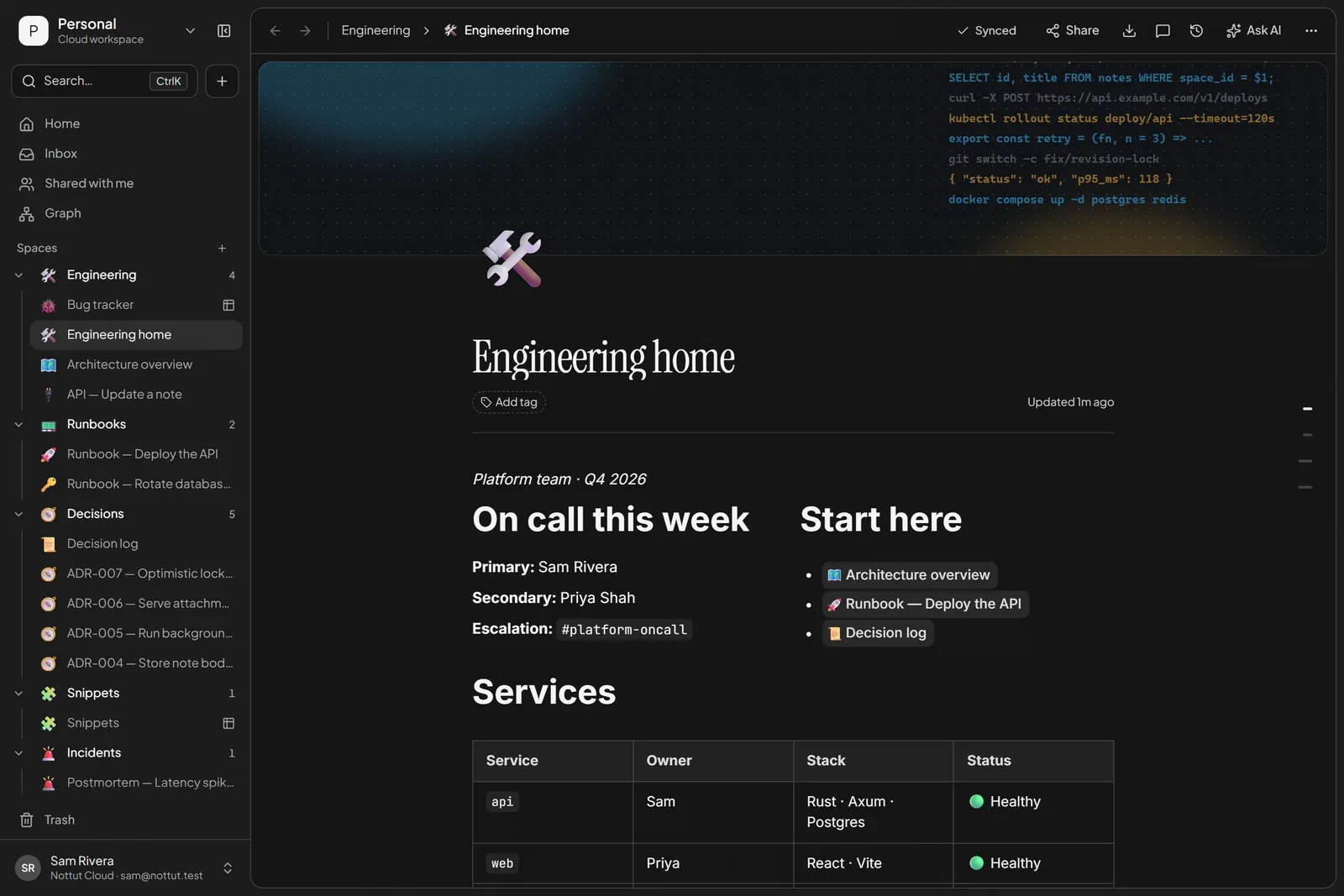
How to build it: add a cover, type /2 col for two columns, and link pages by typing [[ and their name. The services table is a plain table (/table); inline code (wrap text in backticks) keeps service names readable.
2. Runbooks that work at 3 a.m.
A runbook is only useful if someone who is tired and stressed can follow it. Numbered steps, commands you can copy, a warning before anything risky, and the recovery path tucked away until it is needed.
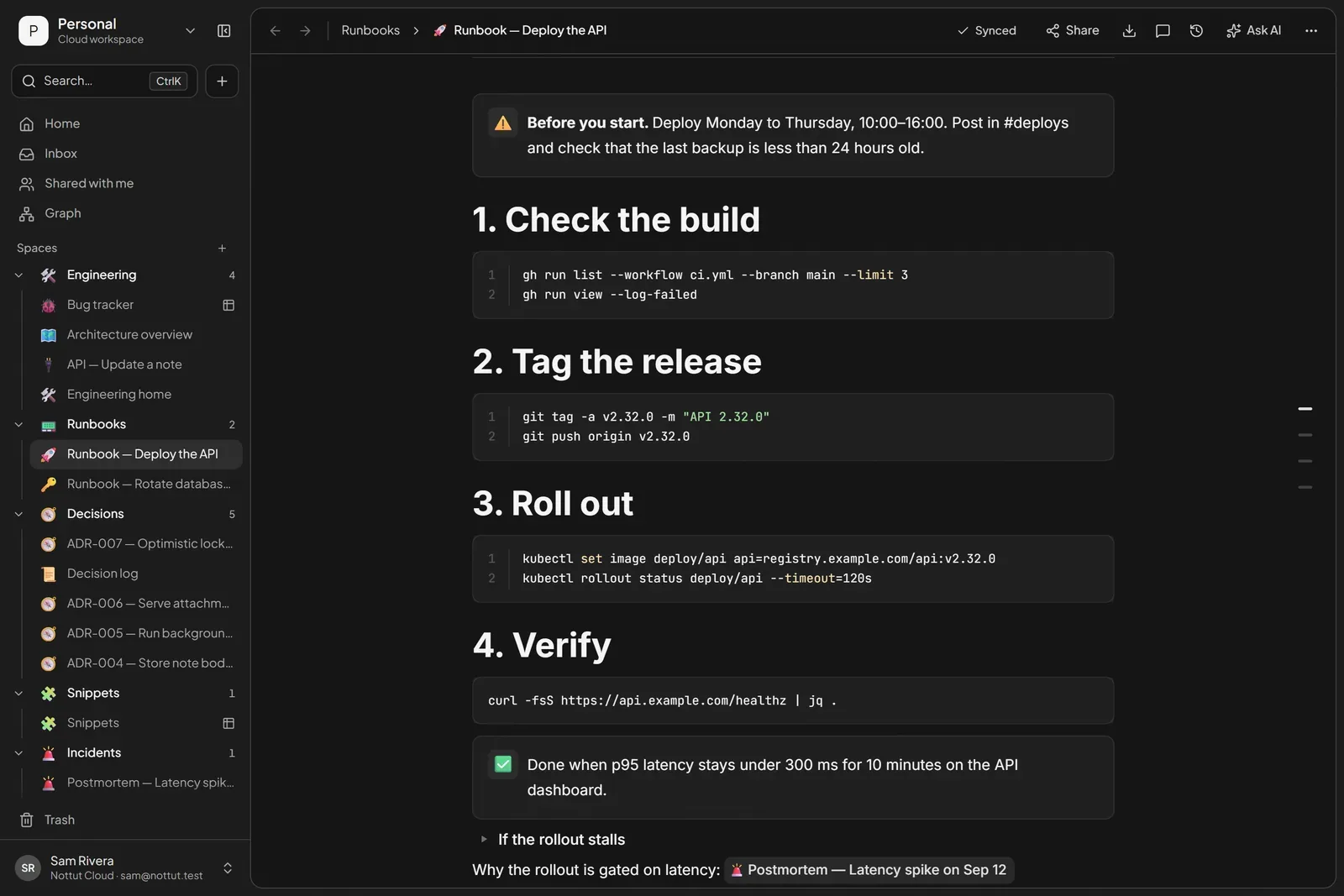
Writing the response down before it is needed pays off. Google's SRE book reports roughly a threefold improvement in mean time to repair when on-call engineers follow a playbook prepared in advance instead of improvising (Treynor Sloss, 2016). AWS's Well-Architected guidance asks every runbook for the same basics: the desired outcome, the tools and permissions needed, error handling, escalation and an owner, validated by having a teammate run it (AWS, OPS07-BP03).
How to build it: type ``` to start a code block and pick the language. Use /callout for warnings and checks, and put long logs or the "if it fails" path in a toggle (/toggle) so the happy path stays short.
3. Architecture decision records with a real log
An architecture decision record (ADR) captures one significant decision: the forces that led to it, what was decided, and the consequences, good and bad. Michael Nygard popularized the lightweight format in 2011, with five sections (title, context, decision, status and consequences) and a rule that reversed decisions stay in the log, marked as superseded (Nygard, 2011). Current guidance from Martin Fowler, AWS and Microsoft adds two habits: one decision per record, and an accepted record is never edited; a new record supersedes it.
Fowler also recommends keeping ADRs next to the code, as Markdown in the repository. If your team does that, keep doing it. Nottut earns its place around the records: drafting and discussing a decision before it is final, keeping the log readable for people who do not live in the repository, and linking each decision to the runbooks, diagrams and incidents it affects. When a record is accepted, export it to Markdown and commit it.
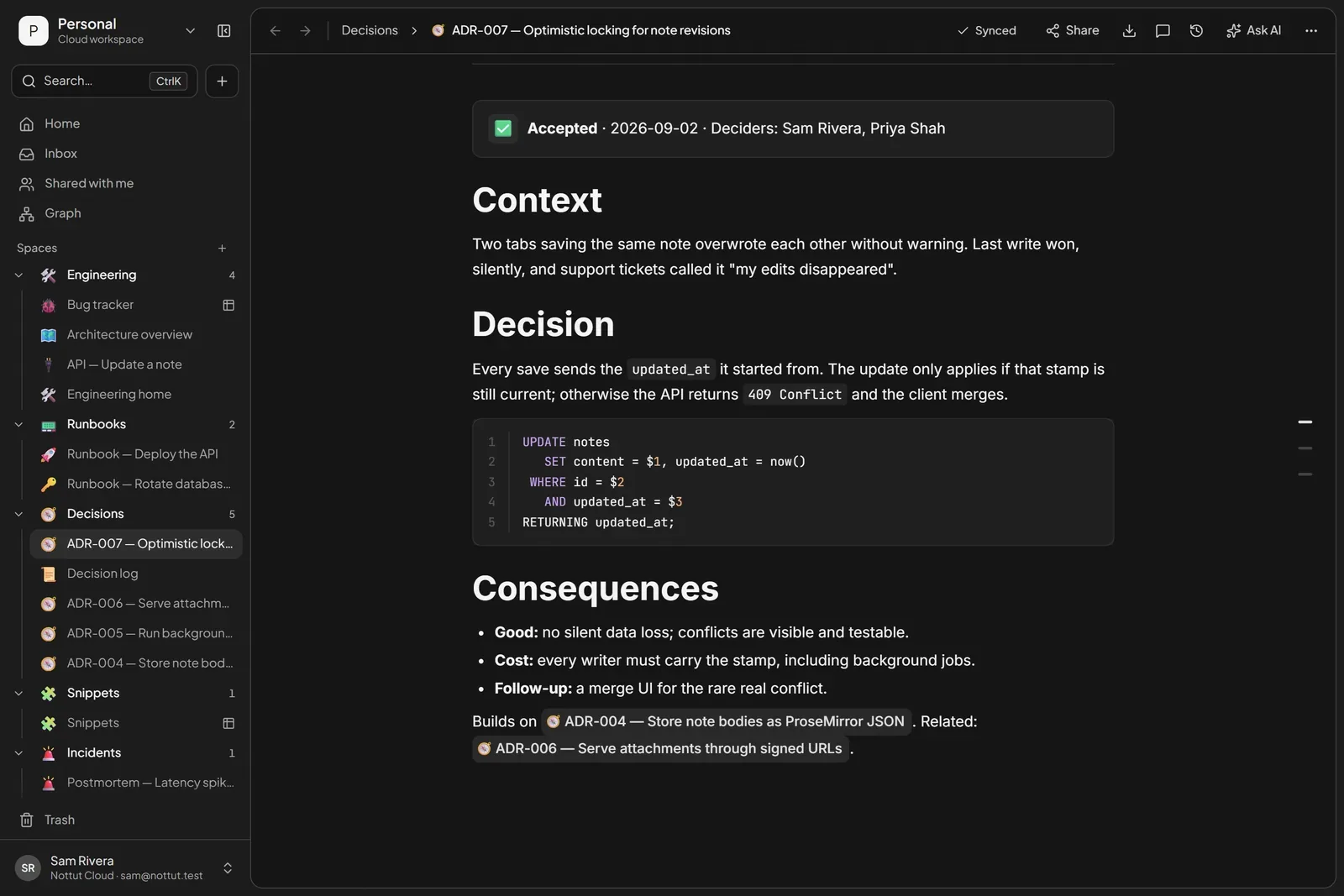
In Nottut, each record is a page, and links do the bookkeeping. Link the record a decision builds on with [[, and that record lists every page that links to it at the bottom. A decision log page with a table of records, one link per row, gives you the index. Save one record as a template from the ··· menu and every new ADR starts with the same sections.
4. API notes: request and response side by side
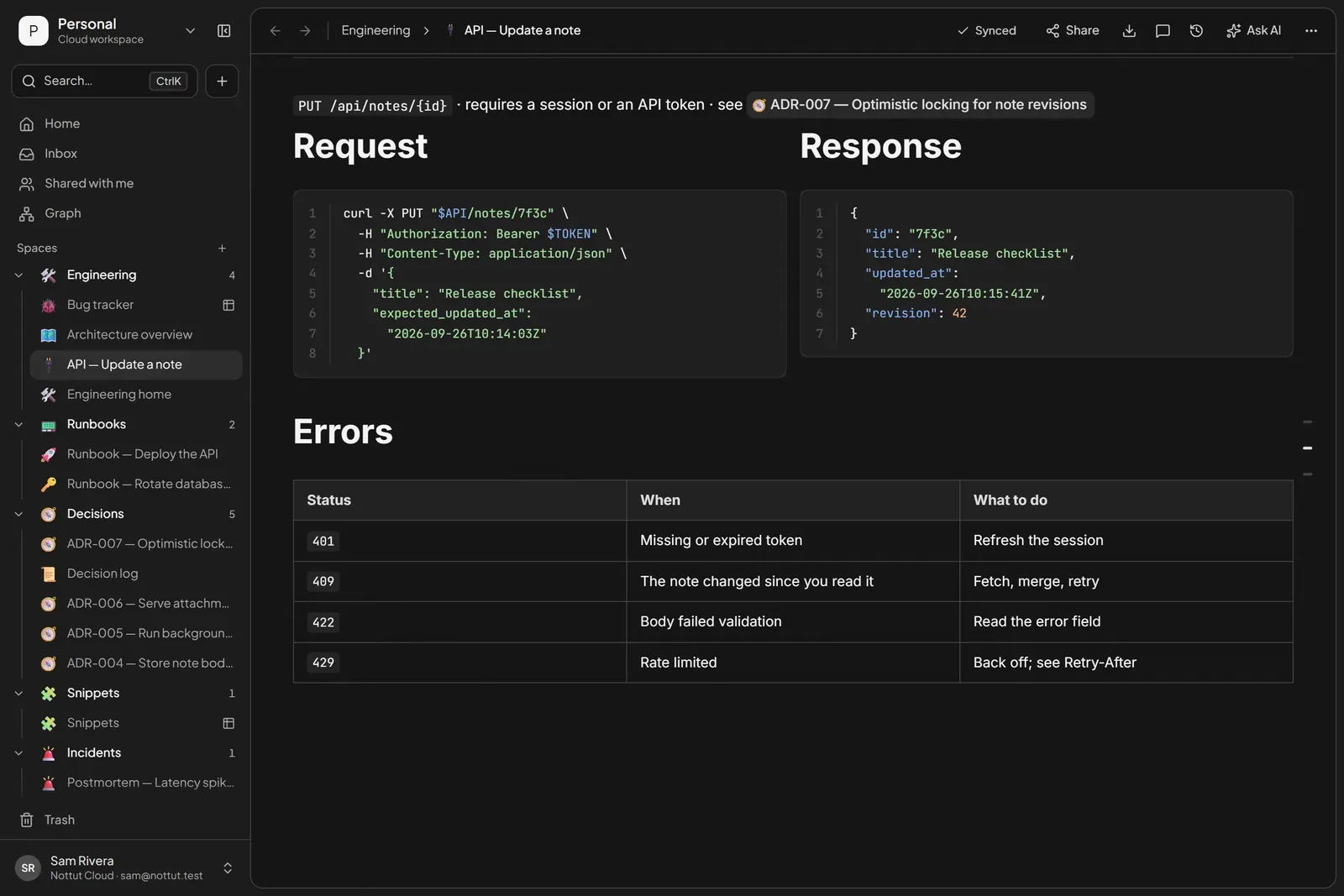
Two columns suit API notes: the request on the left, the response on the right, and the error table underneath. Turn on Full width from the page's ··· menu when code needs the room.
5. Architecture diagrams inside the note
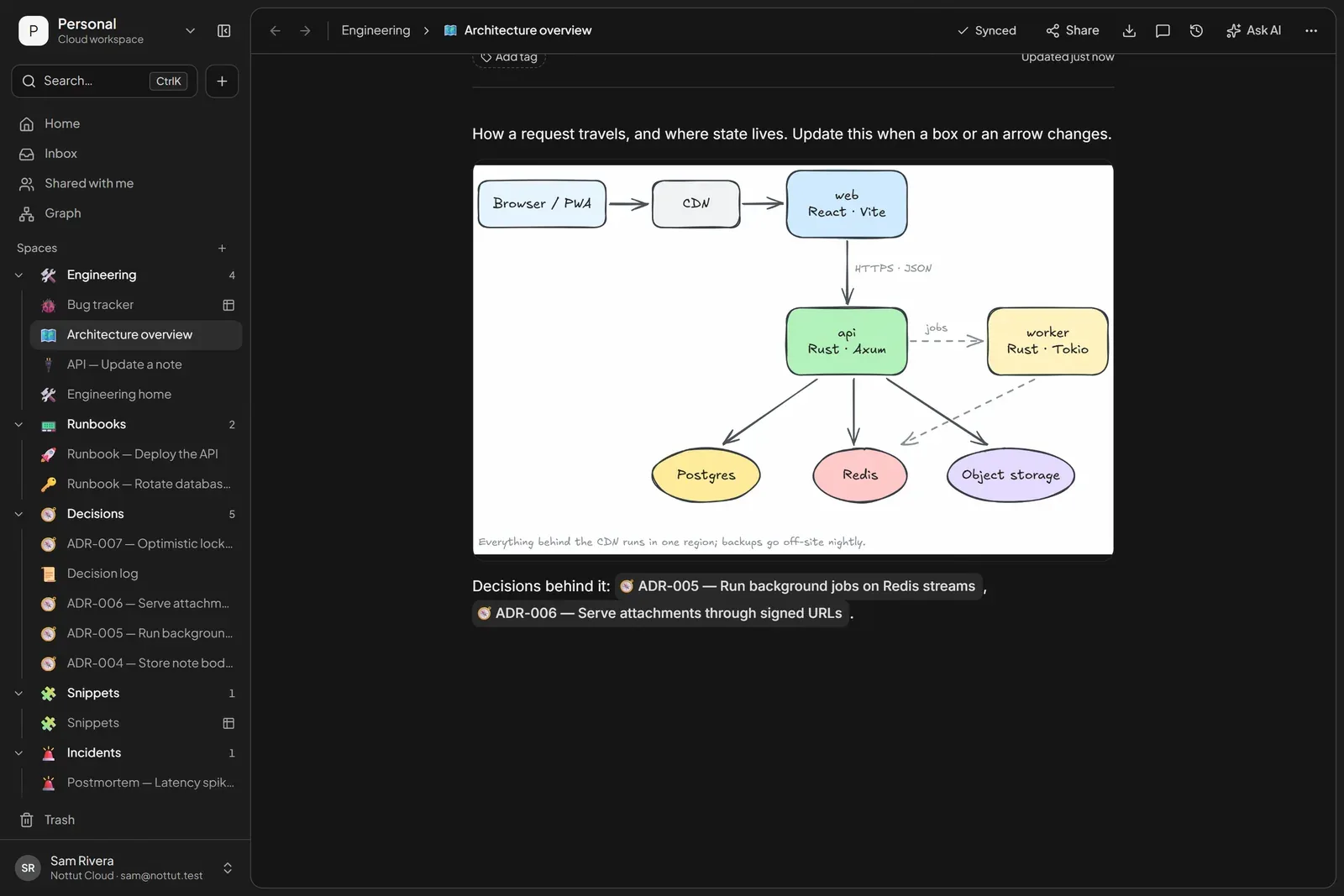
Diagrams go stale when they live in a separate tool. With the Drawing block (/draw), the sketch sits in the page that explains it, in Excalidraw's hand-drawn style, and it is one click away from editing.
6. A snippet library you can filter
Snippets are small, so they get lost. A database gives each one a language, tags and a "last used" date, and each row opens as a page with the code and a line on when to use it.
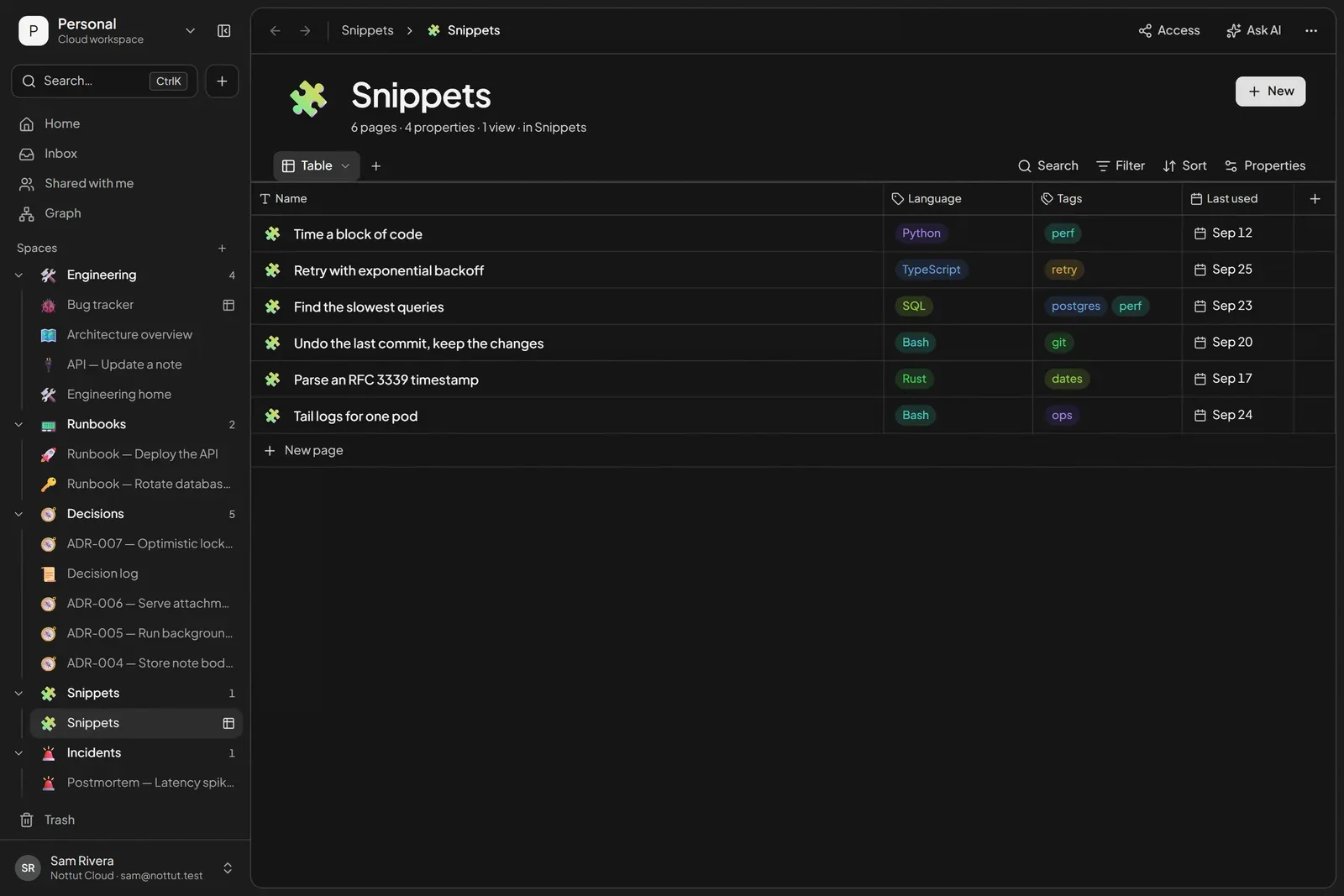
How to build it: open the + menu next to a space and choose New database. Add a select property for the language, a multi-select for tags and a date for last used.
7. A bug board
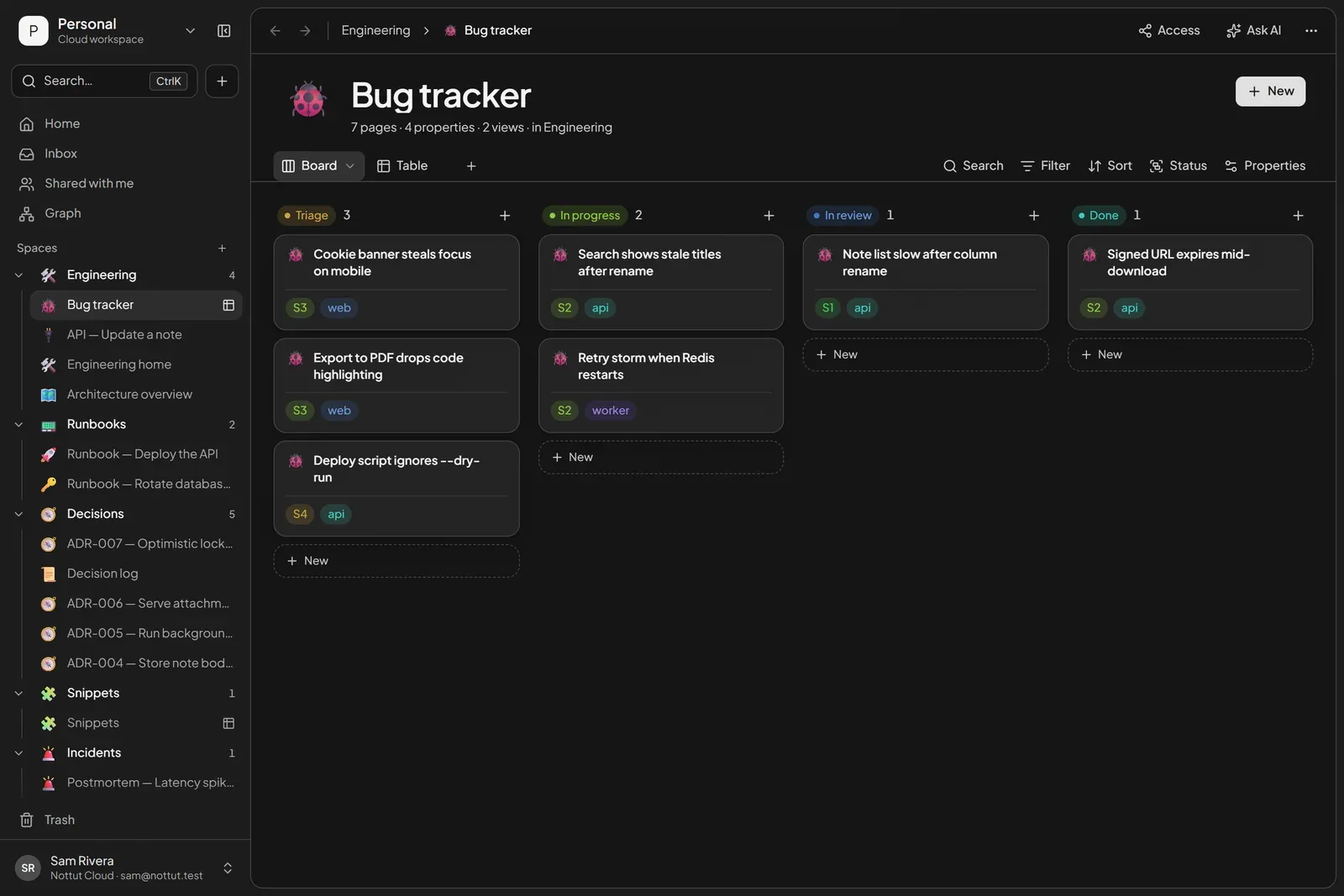
The same database idea makes a lightweight bug tracker: status as the board's columns, severity and service as colored tags. It will not replace your issue tracker, but it is a good home for bugs a small team or a side project would otherwise keep in their heads.
8. Blameless postmortems
Google's SRE book describes the practice most teams now follow (Lunney & Lueder, 2016):
- Agree on the triggers in advance: user-visible downtime past a threshold, data loss, an on-call intervention such as a rollback, a resolution that took too long, or a monitoring failure.
- Write it without blame: look for what in the system let the failure happen, and assume everyone acted in good faith on what they knew.
- Always review it: a postmortem nobody reads changes nothing.
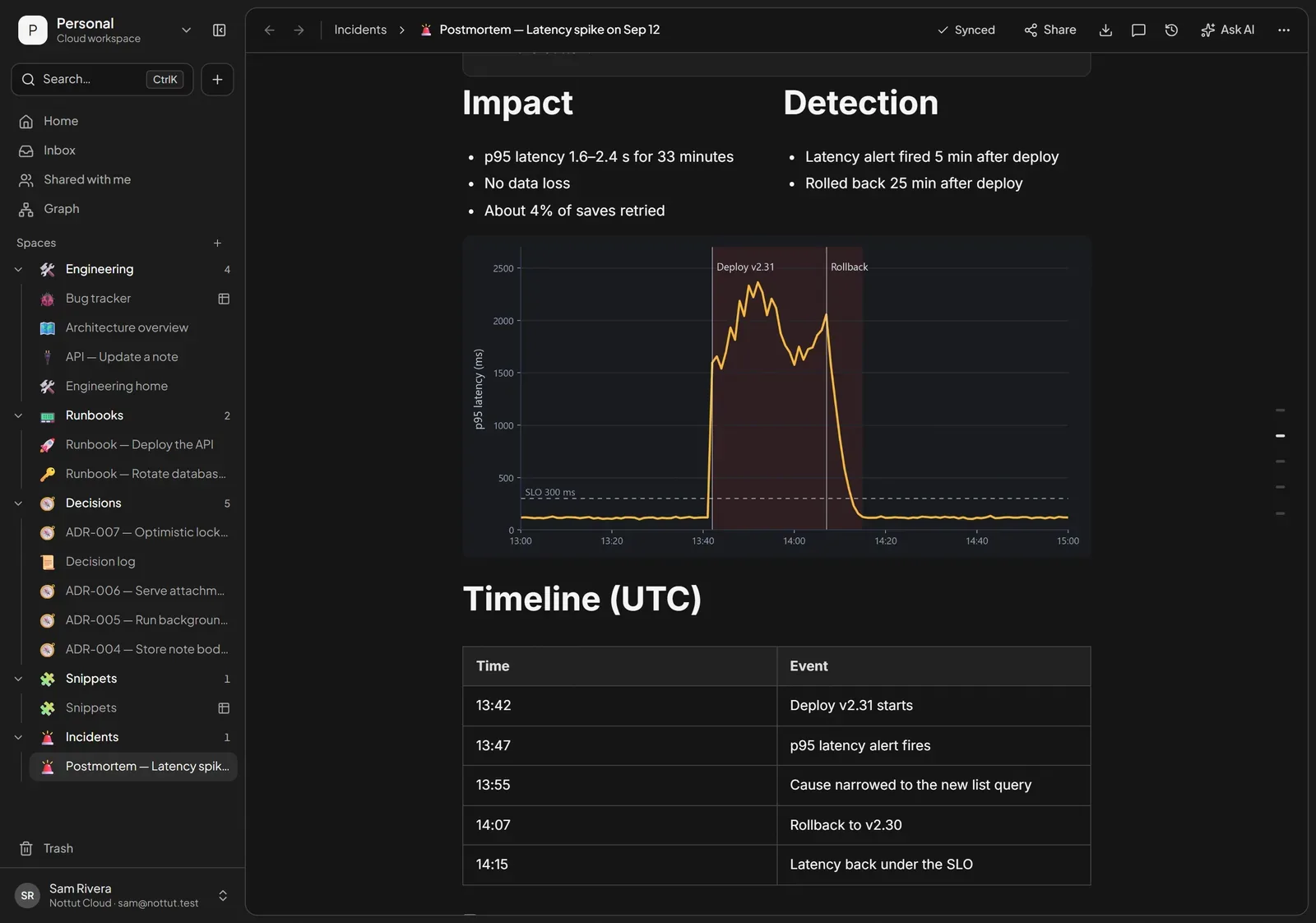
The book's example postmortem (Appendix D) uses a fixed set of sections: summary, impact, root causes, trigger, resolution, detection, action items, lessons learned and a timeline. In Nottut, the graph goes into the page as an image, the timeline is a table, and each action item is a to-do that links to the runbook it changes.
Let your AI assistant read your notes (MCP)
The Model Context Protocol (MCP) is, in its maintainers' words, "an open-source standard for connecting AI applications to external systems." Anthropic introduced it in November 2024 and donated it to the Agentic AI Foundation, a fund under the Linux Foundation, in December 2025. ChatGPT (in developer mode), Claude (custom connectors), VS Code and Cursor can all connect to remote MCP servers.
Nottut runs one. In Settings → Integrations you will find two endpoints:
https://api.nottut.com/mcplets an assistant search and read your notes, and prepare edits for you to confirm.https://api.nottut.com/mcp/readonlyonly searches and reads. Use it for shared company knowledge, or for any client that should never write.
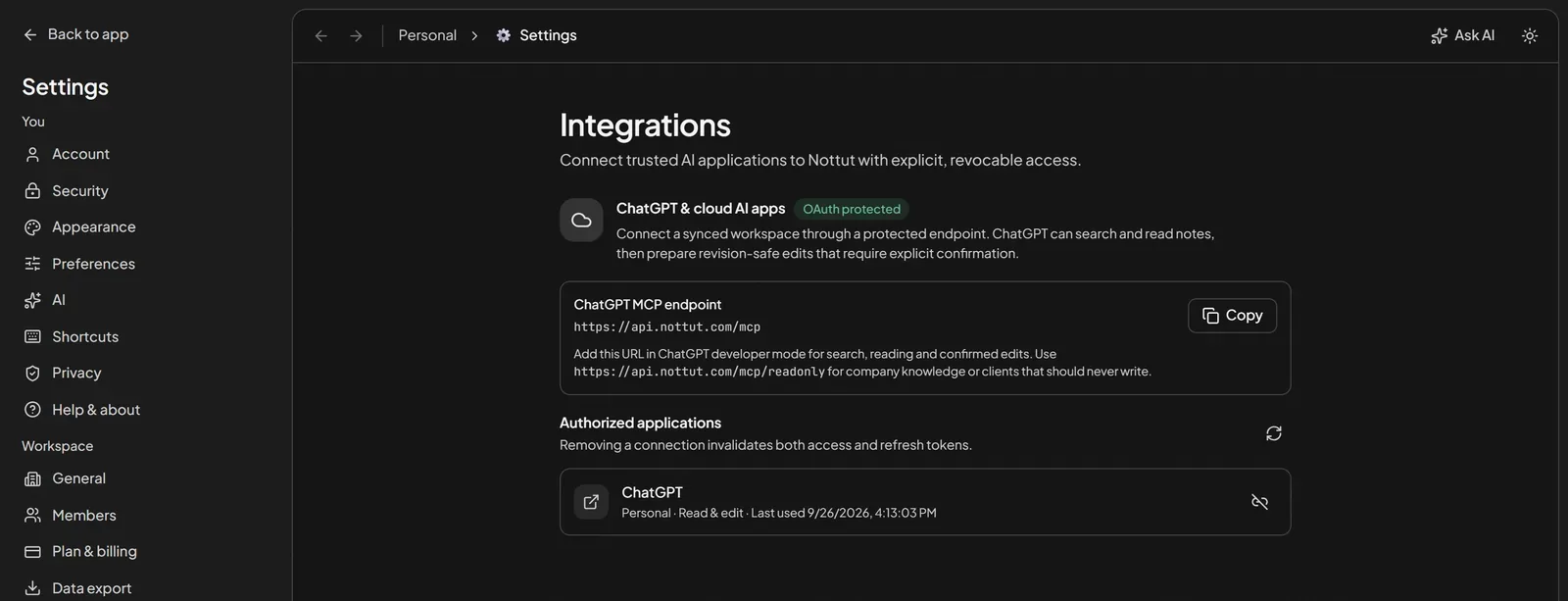
Access goes through OAuth. The assistant sends you to Nottut, where you sign in, choose which workspace it may access, and allow read-only or read-and-edit access. Removing the connection under Authorized applications invalidates both its access and refresh tokens. The Integrations page walks through ChatGPT's developer mode; clients that support remote MCP servers with OAuth and dynamic client registration can use the same endpoint.
Once connected, a question like "what did we decide about note revisions?" becomes a search over your workspace. In our demo workspace, that search returns ADR-007, which the assistant can fetch and answer from, reasoning included, instead of guessing.
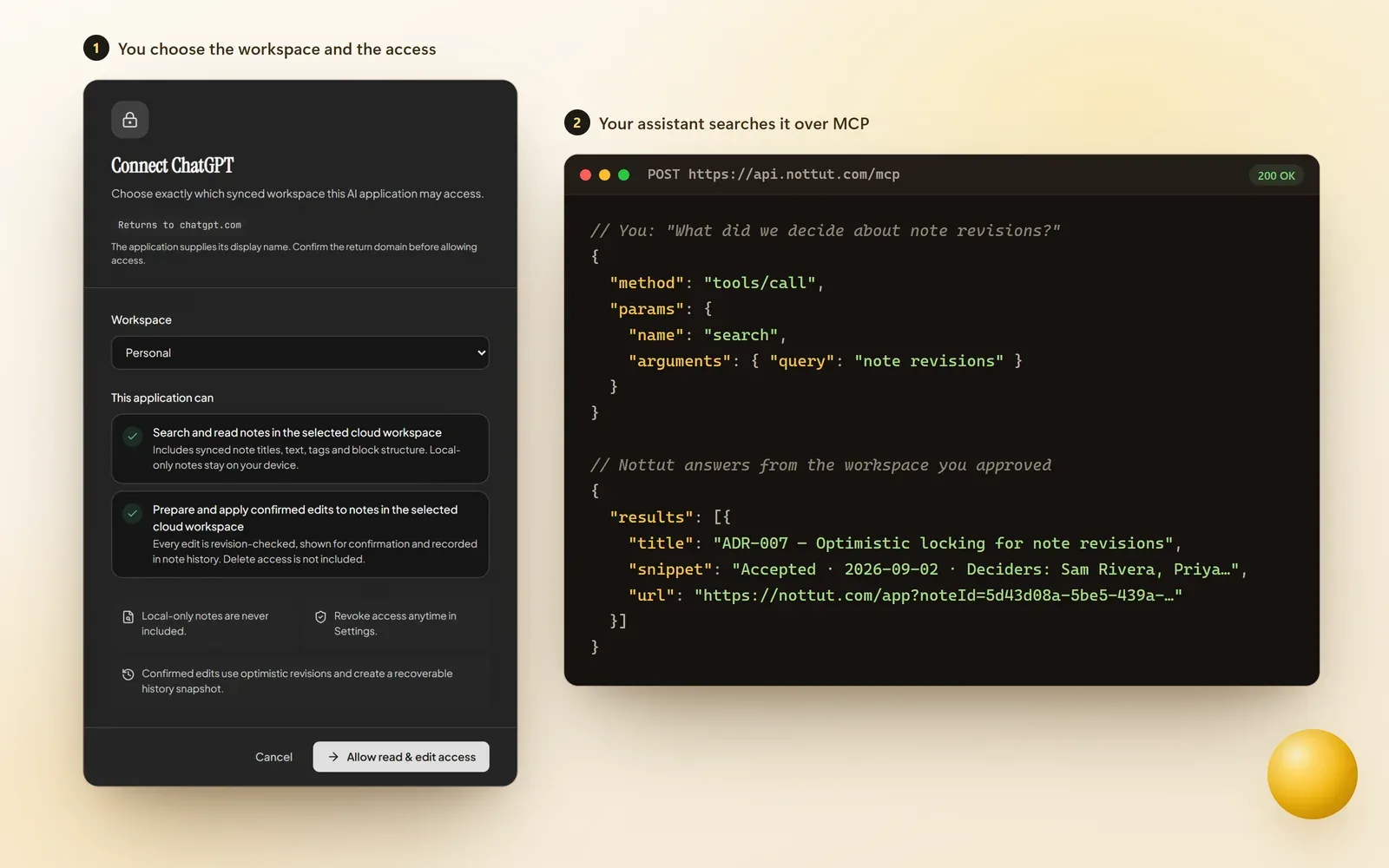
These are the tools an assistant gets. On both endpoints:
get_workspacereturns the one workspace this connection can see.searchsearches note titles and text.fetchreads one note by the ID thatsearchreturned.
On the full endpoint (/mcp) only:
get_note_for_editreturns a note's document and current revision before an edit.propose_note_editprepares an edit for you to review. The proposal expires after 15 minutes.apply_note_editapplies the edit once you confirm it.
Every edit is checked against the note's current revision, shown to you for confirmation, and recorded in the note's history. If someone changed the note in the meantime, the edit fails instead of overwriting their work. No connection can delete a note.
Keyboard and Markdown shortcuts
| Type | You get |
|---|---|
/ | The block menu: code, table, toggle, callout, columns, drawing, math and more |
#, ##, ### then a space | Headings |
- or 1. then a space | Bulleted or numbered list |
[] then a space | To-do item |
``` | Code block |
`code` | Inline code |
--- | Divider |
$$E = mc^2$$ | Math block (KaTeX) |
[[ | Link to another note |
Ctrl+K | Command palette: search the workspace or run a command |
What Nottut does not do
- No Git sync. Notes live in Nottut, not in your repository. Export to Markdown when you need files.
- Code blocks do not run code. They highlight and copy; they are not notebooks.
- No offline mode yet. Nottut needs a connection to load and save.
- No native mobile app. It runs in the browser and installs like an app.
FAQ
Does Nottut support Markdown?
You can write with Markdown shortcuts as you type (headings, lists, to-dos, code blocks, dividers, math), import Markdown files, and export any page as Markdown, HTML or PDF.
Which languages does the code block highlight?
The 37 languages in highlight.js's common set, including Bash, C, C++, C#, CSS, Go, GraphQL, Java, JavaScript, JSON, Kotlin, PHP, Python, Ruby, Rust, SQL, Swift, TypeScript and YAML.
Can ChatGPT or other AI tools read my Nottut notes?
Yes, through Nottut's MCP endpoint. You sign in to Nottut and approve access, the connection can be read-only, and you can revoke it at any time from Settings → Integrations.
Is there a dark mode?
Yes. Nottut has four themes, each with a light and a dark mode.
Can I publish documentation publicly?
Yes. Open Share on a page and turn on Publish to web to give it a public link.
The short version
Keep runbooks, decisions, diagrams, snippets and postmortems in one linked workspace, write them with the keyboard, and let your AI assistant search them through MCP. Create a free account and start with an engineering home page.
Related reading: Note-taking workflow: turning notes into finished work · How to take better notes · The Zettelkasten method
Sources
- Amazon Web Services. Architectural decision record process. AWS Prescriptive Guidance: Using architectural decision records. docs.aws.amazon.com
- Amazon Web Services. OPS07-BP03 Use runbooks to perform procedures. AWS Well-Architected Framework, Operational Excellence Pillar. docs.aws.amazon.com
- Anthropic. (2024, November 25). Introducing the Model Context Protocol. anthropic.com
- Atlassian. (2025). Atlassian research: AI adoption is rising, but friction persists (State of Developer Experience Report 2025). atlassian.com
- Fowler, M. (2026, March 24). Architecture decision record. martinfowler.com
- Google. (2016). Appendix D: Example postmortem. In B. Beyer, C. Jones, J. Petoff & N. R. Murphy (Eds.), Site reliability engineering. O'Reilly. sre.google
- Lunney, J., & Lueder, S. (2016). Postmortem culture: Learning from failure. In B. Beyer, C. Jones, J. Petoff & N. R. Murphy (Eds.), Site reliability engineering. O'Reilly. sre.google
- Microsoft. Maintain an architecture decision record (ADR). Azure Well-Architected Framework. learn.microsoft.com
- Model Context Protocol. What is the Model Context Protocol (MCP)? modelcontextprotocol.io
- Model Context Protocol. (2025, December 9). MCP joins the Agentic AI Foundation. blog.modelcontextprotocol.io
- Nygard, M. (2011, November 15). Documenting architecture decisions. cognitect.com
- OpenAI. Developer mode. developers.openai.com
- Treynor Sloss, B. (2016). Introduction. In B. Beyer, C. Jones, J. Petoff & N. R. Murphy (Eds.), Site reliability engineering. O'Reilly. sre.google