How to Take Notes on a Laptop (and Still Remember Them)
Typing notes works if you avoid two traps: transcribing word for word and getting distracted. A research-backed setup for before, during and after class.
Taking notes on a laptop is not the mistake it is often made out to be. The famous finding that typists learn less has not held up well in replications. What the research does show is that laptop note-takers fall into two traps: typing the lecture word for word and drifting into other apps. Avoid those, review what you typed, and a laptop is a perfectly good way to take notes.
This guide covers what the evidence says, then gives a practical setup for before, during and after class.
Key takeaways
- Typing versus handwriting makes a small difference at most. Direct replications of the original laptop study found no reliable gap; the newest meta-analysis finds a small advantage for handwriting.
- Typing gives you more notes, and more notes help, as long as they are not a verbatim transcript.
- Distraction is the bigger risk. Off-task use of laptops in class is linked to lower exam scores, for the user and for the people who can see the screen.
- Reviewing your notes matters more than the medium. The handwriting advantage roughly doubled when students reviewed their notes, so build review into your routine.
- Use structure while you type: one page per lecture, headings as topics change, short phrases instead of sentences, and questions you can test yourself on later.
Table of contents
- Is it bad to take notes on a laptop?
- Before class: set up the page and the screen
- During class: capture ideas, not transcripts
- Keep the laptop from distracting you
- After class: review, then test yourself
- When handwriting is the better choice
- How to take laptop notes in Nottut
- FAQ
Is it bad to take notes on a laptop?
The worry comes from a 2014 study by Mueller and Oppenheimer: across three experiments, students who typed did worse on conceptual questions than students who wrote by hand, and their notes contained more verbatim text. It was widely reported as "handwriting beats typing."
Later work is more mixed:
- Two direct replications found no reliable difference. Morehead and colleagues (2019) found no consistent differences between groups. Urry and colleagues (2021) found that laptop notes were longer and more verbatim, but quiz scores did not differ.
- Meta-analyses disagree slightly. Voyer and colleagues (2022) estimated an effect close to zero. Flanigan and colleagues (2024), pooling 24 studies of college students, found a small advantage for handwriting (g = 0.248) that rose to 0.421 when students reviewed their notes.
- Typing produces much more: in the same meta-analysis, typed notes were far longer (g = 0.919).
So the medium matters little. How you type, whether you stay on task, and whether you review afterwards matter more. For a fuller look at this research, see how to take better notes; our literature review guide uses the same studies as its worked example.
Before class: set up the page and the screen
- One page per lecture, named with the course, number and topic, for example Econ 101 — Lecture 6: Price elasticity. A consistent name makes notes easy to find before the exam.
- Start from a template with the same sections every time: Key ideas, Examples, Questions and Summary. You will not have to think about structure while the lecturer is talking.
- Open the slides or reading for the lecture if your instructor shares them, so you can write about what is said instead of copying what is on the screen.
- Close everything else. One window, notifications off, the browser in full screen. More on why below.
- Charge the laptop and keep a pen and paper nearby for anything that is faster to sketch than to type.
During class: capture ideas, not transcripts
Type in your own words, in short phrases. Fast typists can take down almost everything, and that is the trap: transcribing lets you type without thinking about what you hear. Mueller and Oppenheimer linked verbatim notes to weaker conceptual understanding, and in an earlier lab study, students who summarized or paraphrased did better than students who copied verbatim (Bretzing & Kulhavy, 1979). Aim for the idea, a key term and an example.
But do not stop typing to polish. More complete notes help: note quantity predicted recall in Bui and colleagues' study, and note quality was the main predictor of test scores in Peverly and colleagues'. Incomplete phrases are fine; you will clean them up later.
Structure as you go:
- Start a new heading when the topic changes.
- Use bullets and indentation for points and sub-points.
- Write examples right under the idea they illustrate.
- Mark anything you did not understand, for example with a to-do item such as "Ask: why is demand more elastic in the long run?", so you can look it up later.
Formulas and diagrams: type simple formulas, and sketch complex diagrams on paper or in a drawing tool, then add them to the page after class. Luo and colleagues found that handwritten notes contained more visuals, so do not let the keyboard push them out of your notes.
Keep the laptop from distracting you
The clearest evidence against laptops in class is not about typing; it is about everything else a laptop can do:
- In a randomized trial at West Point, allowing computers in class lowered final-exam scores by about 0.2 standard deviations (Carter and colleagues, 2017).
- When researchers logged students' real internet use during class, non-academic use was common and was linked to lower exam performance, even after accounting for motivation, interest and intelligence. Class-related internet use did not help (Ravizza and colleagues, 2017).
- Multitasking hurt both the multitasker and the students who could see the screen in a set of experiments by Sana and colleagues (2013).
- Monitoring software found non-course applications open and active about 42% of the time during lectures (Kraushaar and Novak, 2010).
What helps:
- One app, full screen. Put the browser or note app in full screen and close other tabs before class starts.
- Notifications off at the system level, including messages and email.
- Sit where your screen does not face other students, for their sake as much as yours.
- Decide in advance what you will do when you are bored: write down a question instead of opening a new tab.
After class: review, then test yourself
Review is where notes pay off. In the Flanigan meta-analysis, the effect of note-taking on learning roughly doubled when students reviewed their notes. Two steps work well:
- The same day or the next, clean up the page. Fill gaps from the slides or a classmate, fix half-finished phrases, and write a three- or four-sentence summary in your own words.
- Turn the key ideas into questions and answer them from memory before your next class. Testing yourself is one of the best-supported study techniques there is; see our guide to study techniques ranked by evidence and to active recall and spaced repetition.
When handwriting is the better choice
- Math-heavy and diagram-heavy classes, where most of what you write is symbols, graphs or drawings. A tablet with a stylus, or paper, is faster.
- When you cannot keep the laptop on task. If you know you will drift, paper removes the temptation.
- When your instructor bans devices. Some do, for the distraction reasons above.
Otherwise, use what lets you capture the most ideas in your own words, and spend your effort on review.
How to take laptop notes in Nottut
Nottut is a note-taking app that runs in your browser, so it works on any laptop: Windows, macOS, Linux or a Chromebook. Here is the routine above inside it.
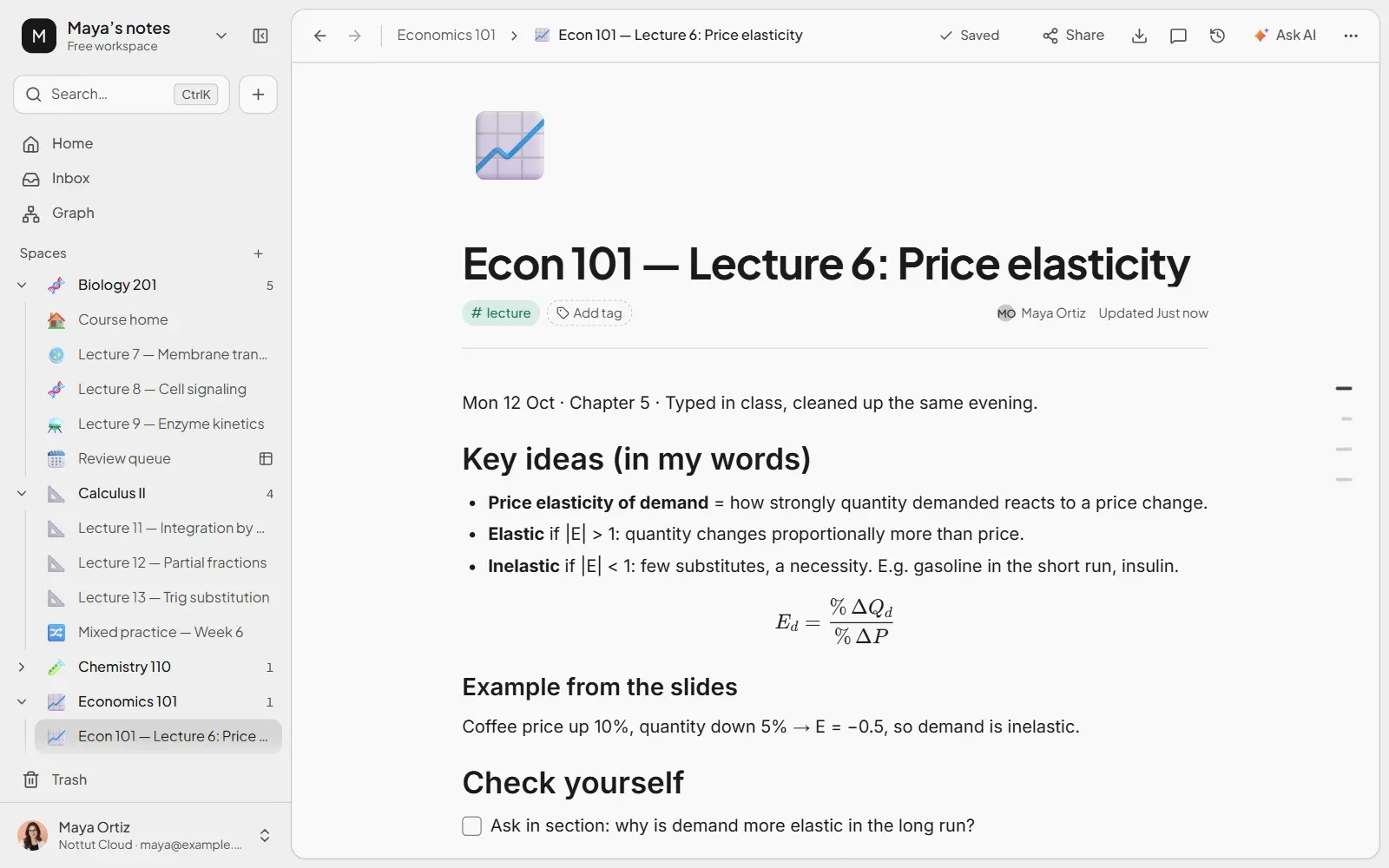
A page per lecture, with structure. Give each course its own space in the sidebar, click + next to it for a new page, and type as you would in a text editor. Markdown shortcuts turn into structure as you type: # makes a heading, - a bullet and [ ] a to-do. For formulas, type them between double dollar signs, such as $$E = mc^2$$, and they render as math.
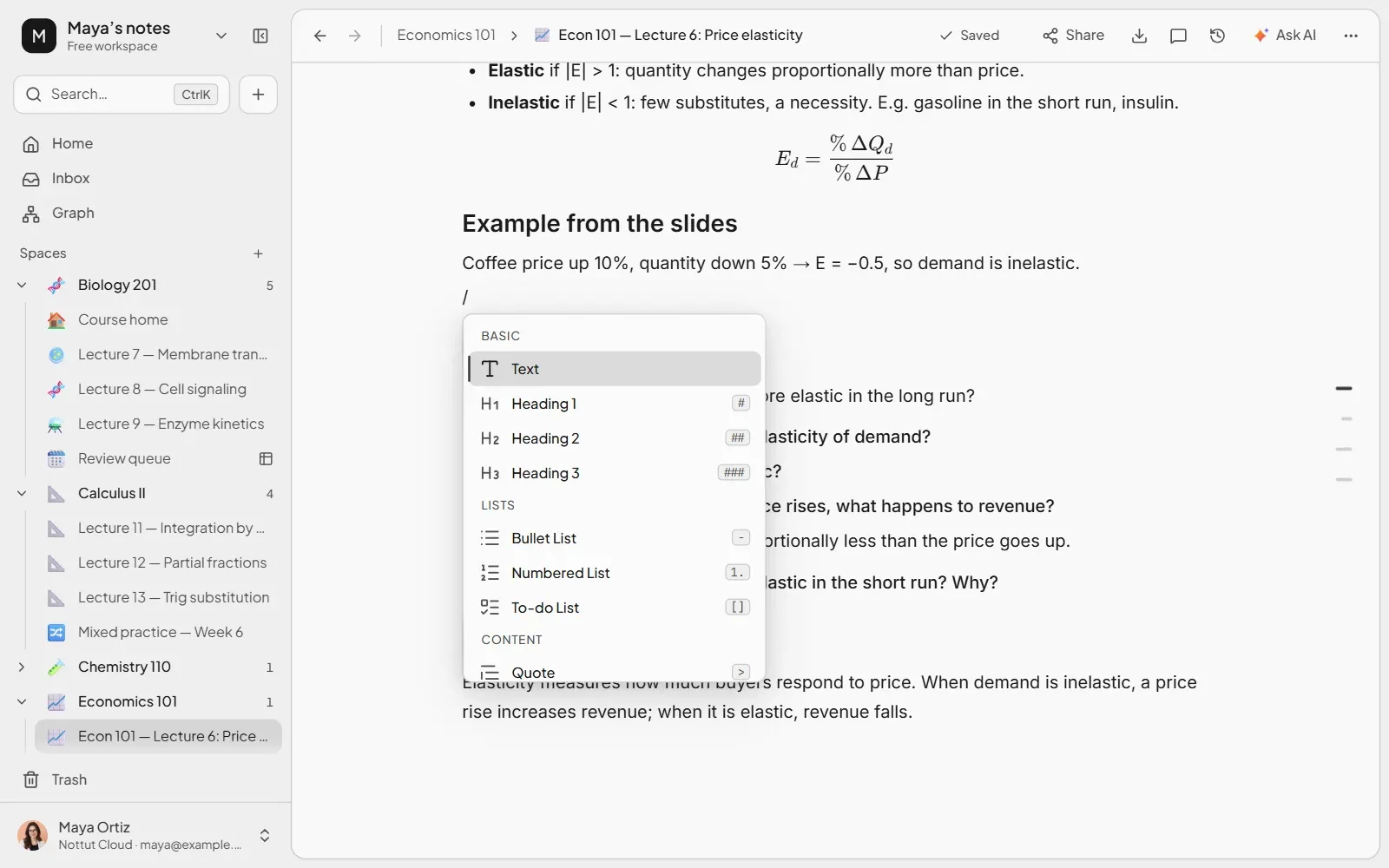
Every block is one keystroke away. Type / for the block menu: headings, lists, to-dos, toggles, tables, math, drawings, files and more.
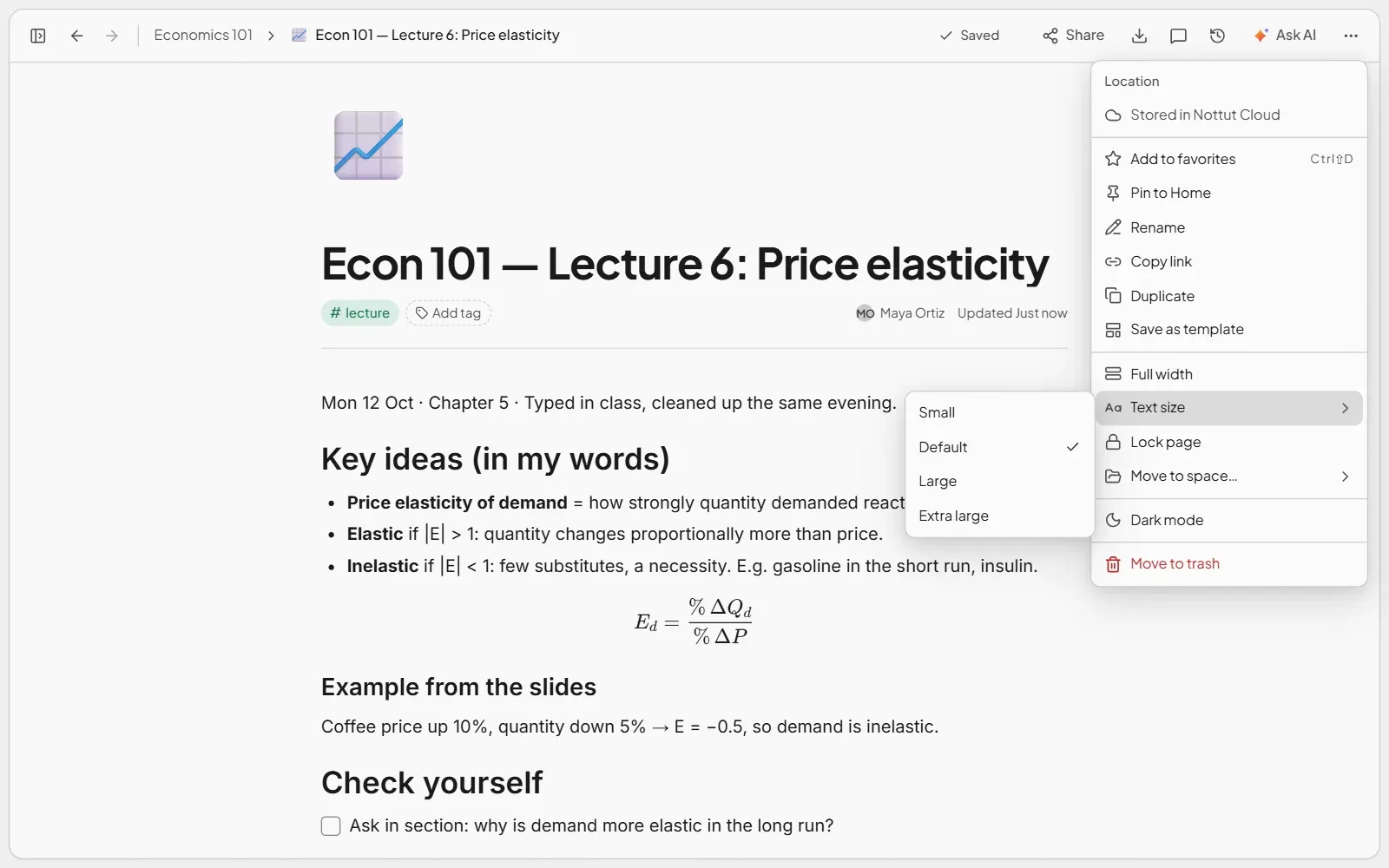
A quieter screen. Press Ctrl+\ to hide the sidebar, and use the ••• menu at the top right to make the page full width or change the text size. Then put the browser in full screen.
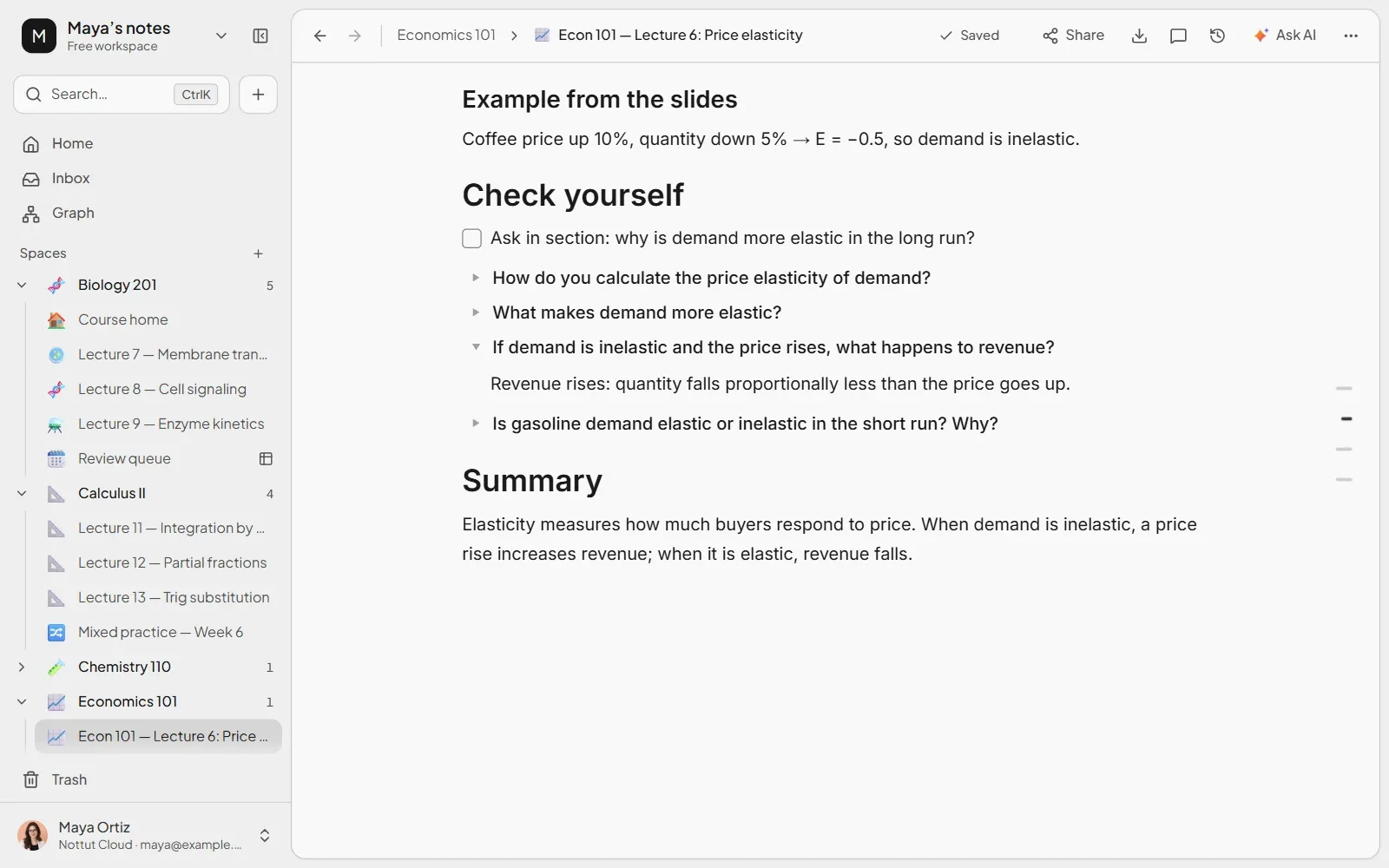
Questions for review. Under a Check yourself heading, type /toggle and write each question as the toggle's title with the answer inside, so it stays hidden until you have tried. Save your lecture layout once with ••• → Save as template, then start each new lecture from it with Create new → From template.
Nottut needs an internet connection and has no offline mode yet, so check the Wi-Fi in your lecture hall before you rely on it.
FAQ
Is it better to take notes on a laptop or by hand?
The difference is small. Replications of the original laptop study found no reliable gap, and the newest meta-analysis found a small advantage for handwriting that grows when notes are reviewed. Choose the one that lets you capture ideas in your own words without distraction, and review either way.
How do I take notes faster on a laptop?
Use short phrases instead of sentences, abbreviations you will recognize later, and keyboard shortcuts for structure instead of menus. A template with your usual sections saves the most time.
Should I type notes word for word?
No. Verbatim notes are linked to weaker understanding of concepts. Capture the idea, the key term and an example in your own words, but keep typing: complete notes help more than perfect ones.
How do I avoid getting distracted on my laptop in class?
Close every other app and tab, put your note app in full screen, turn notifications off, and write down questions instead of searching for them during class. Off-task use is the main reason laptops are linked to lower grades.
What is the best way to organize laptop notes?
One page per lecture with a consistent name, the same sections every time (key ideas, examples, questions, summary), and one place per course. Consistency matters more than any particular app.
Can I take math notes on a laptop?
Yes for simple formulas, which many apps can render from typed text. For heavy math, graphs and diagrams, a tablet with a stylus or paper is usually faster.
The short version
Typing your notes is fine. Type ideas in your own words rather than transcripts, keep the laptop on one app with notifications off, and review your notes the same day or the next, turning key ideas into questions. If you want a page per lecture with structure, formulas and review questions in one place, try Nottut free.
Related reading: How to take better notes · Study techniques ranked by evidence · Active recall and spaced repetition
Sources
- Bretzing, B. H., & Kulhavy, R. W. (1979). Notetaking and depth of processing. Contemporary Educational Psychology, 4(2), 145–153. doi.org/10.1016/0361-476X(79)90069-9
- Bui, D. C., Myerson, J., & Hale, S. (2013). Note-taking with computers: Exploring alternative strategies for improved recall. Journal of Educational Psychology, 105(2), 299–309. doi.org/10.1037/a0030367
- Carter, S. P., Greenberg, K., & Walker, M. S. (2017). The impact of computer usage on academic performance: Evidence from a randomized trial at the United States Military Academy. Economics of Education Review, 56, 118–132. doi.org/10.1016/j.econedurev.2016.12.005
- Flanigan, A. E., Wheeler, J., Colliot, T., Lu, J., & Kiewra, K. A. (2024). Typed versus handwritten lecture notes and college student achievement: A meta-analysis. Educational Psychology Review, 36, Article 78. doi.org/10.1007/s10648-024-09914-w
- Kraushaar, J. M., & Novak, D. C. (2010). Examining the affects of student multitasking with laptops during the lecture. Journal of Information Systems Education. ERIC EJ893903
- Luo, L., Kiewra, K. A., Flanigan, A. E., & Peteranetz, M. S. (2018). Laptop versus longhand note taking: Effects on lecture notes and achievement. Instructional Science, 46(6), 947–971. doi.org/10.1007/s11251-018-9458-0
- Morehead, K., Dunlosky, J., & Rawson, K. A. (2019). How much mightier is the pen than the keyboard for note-taking? A replication and extension of Mueller and Oppenheimer (2014). Educational Psychology Review, 31(3), 753–780. doi.org/10.1007/s10648-019-09468-2
- Mueller, P. A., & Oppenheimer, D. M. (2014). The pen is mightier than the keyboard: Advantages of longhand over laptop note taking. Psychological Science, 25(6), 1159–1168. doi.org/10.1177/0956797614524581
- Peverly, S. T., Ramaswamy, V., Brown, C., Sumowski, J., Alidoost, M., & Garner, J. (2007). What predicts skill in lecture note taking? Journal of Educational Psychology, 99(1), 167–180. doi.org/10.1037/0022-0663.99.1.167
- Ravizza, S. M., Uitvlugt, M. G., & Fenn, K. M. (2017). Logged in and zoned out: How laptop internet use relates to classroom learning. Psychological Science, 28(2), 171–180. doi.org/10.1177/0956797616677314
- Sana, F., Weston, T., & Cepeda, N. J. (2013). Laptop multitasking hinders classroom learning for both users and nearby peers. Computers & Education, 62, 24–31. doi.org/10.1016/j.compedu.2012.10.003
- Urry, H. L., Crittle, C. S., Floerke, V. A., et al. (2021). Don't ditch the laptop just yet: A direct replication of Mueller and Oppenheimer's (2014) Study 1 plus mini meta-analyses across similar studies. Psychological Science, 32(3), 326–339. doi.org/10.1177/0956797620965541
- Voyer, D., Ronis, S. T., & Byers, N. (2022). The effect of notetaking method on academic performance: A systematic review and meta-analysis. Contemporary Educational Psychology, 68, 102025. doi.org/10.1016/j.cedpsych.2021.102025